Security, Quarantine, and Safe Skill Installation: How Skillsmith Protects You
A deep dive into Skillsmith's defense-in-depth security architecture—from static analysis to trust tiers—and why you can install skills with confidence
Updated: February 12, 2026
Installing third-party code into your development environment requires trust. When you install an agent skill, you’re giving it access to your projects, your files, and your agent’s capabilities.
We take that responsibility seriously.
This guide explains Skillsmith’s multi-layered security architecture: how we scan skills before indexing, how trust tiers help you make informed decisions, and what happens during the quarantine process that protects you from malicious content.
The Threat Landscape
Before explaining our defenses, let’s be honest about the risks. Skills are powerful—and that power can be misused.
What Could Go Wrong?
| Threat | Severity | Example |
|---|---|---|
| Malicious instructions | Critical | A skill that tells Claude to exfiltrate your .env files |
| Prompt injection | Critical | Hidden text that hijacks Claude’s behavior |
| AI role injection | Critical | system: or assistant: prefixes that override context |
| Dependency hijacking | High | A skill referencing compromised external URLs |
| Author compromise | Medium | A trusted author’s account gets hacked |
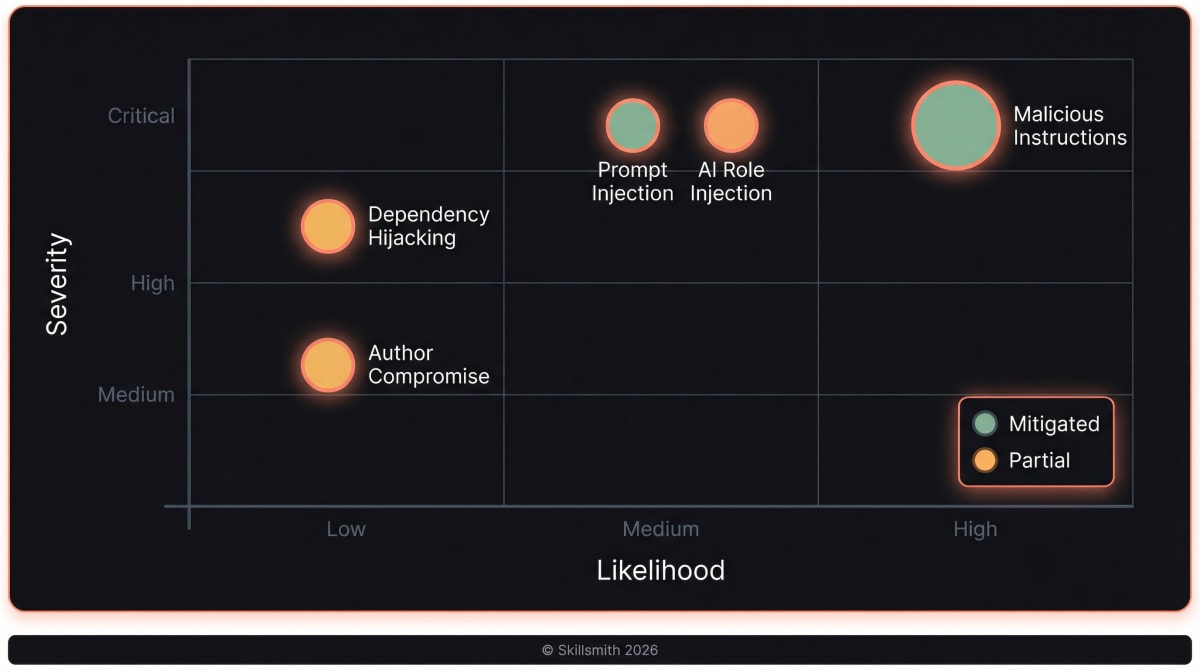
We can’t eliminate all risk—no system can. But we can make attacks harder, detection faster, and decisions clearer.
Defense in Depth: Our Security Architecture
Skillsmith uses multiple security layers. If one fails, others catch the threat.
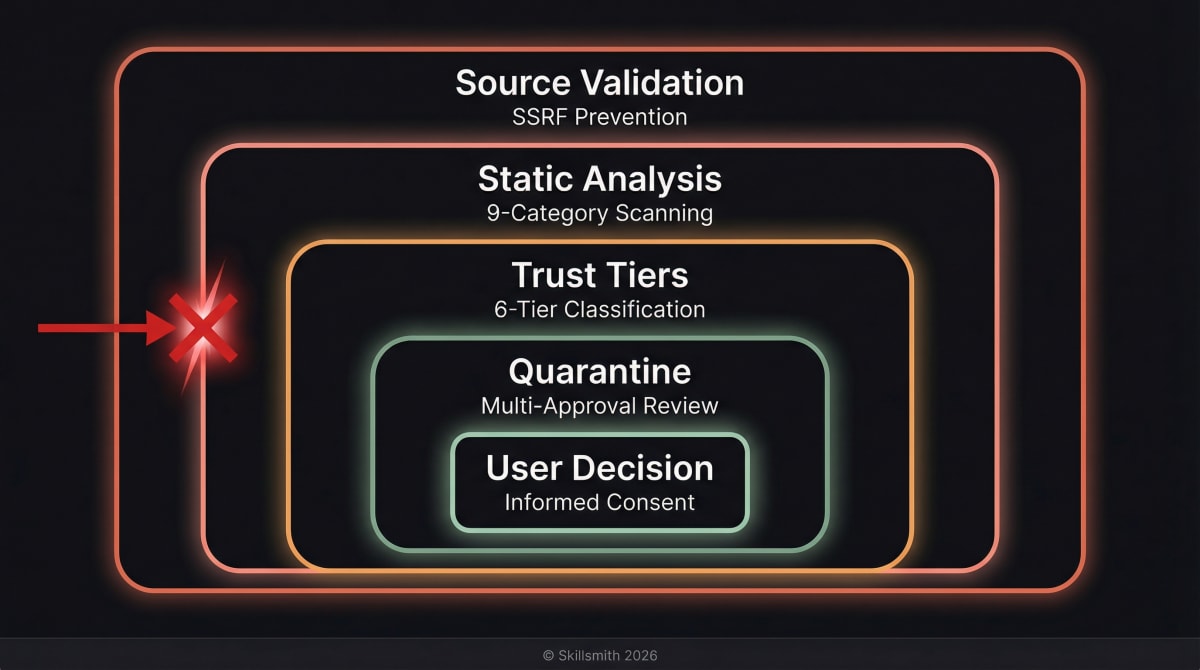
Layer 1: Source Validation
Before we even look at a skill’s content, we validate where it comes from.
SSRF Prevention: We block requests to internal networks, localhost, and cloud metadata services:
// Blocked IP ranges
const BLOCKED_RANGES = [
  '10.0.0.0/8',      // Private
  '172.16.0.0/12',   // Private
  '192.168.0.0/16',  // Private
  '127.0.0.0/8',     // Localhost
  '169.254.0.0/16',  // Link-local (cloud metadata)
];
Path Traversal Prevention: We normalize all file paths and reject attempts to escape allowed directories:
// This attack fails
const maliciousPath = '../../../etc/passwd';
// Normalized and validated against root directory
// Result: Error - Path traversal detected
Layer 2: Static Analysis
Every skill passes through our security scanner with nine categories of pattern detection. This is the quarantine phase — details below.
Layer 3: Trust Tiers
Skills are classified into six trust tiers, giving you clear signals about risk and controlling scanner strictness per tier.
Layer 4: Quarantine
Skills flagged as malicious enter an authenticated review workflow requiring multi-approval before any action is taken.
Layer 5: User Decision
You always have the final say. We provide information; you decide.
The Quarantine Process: Static Analysis in Detail
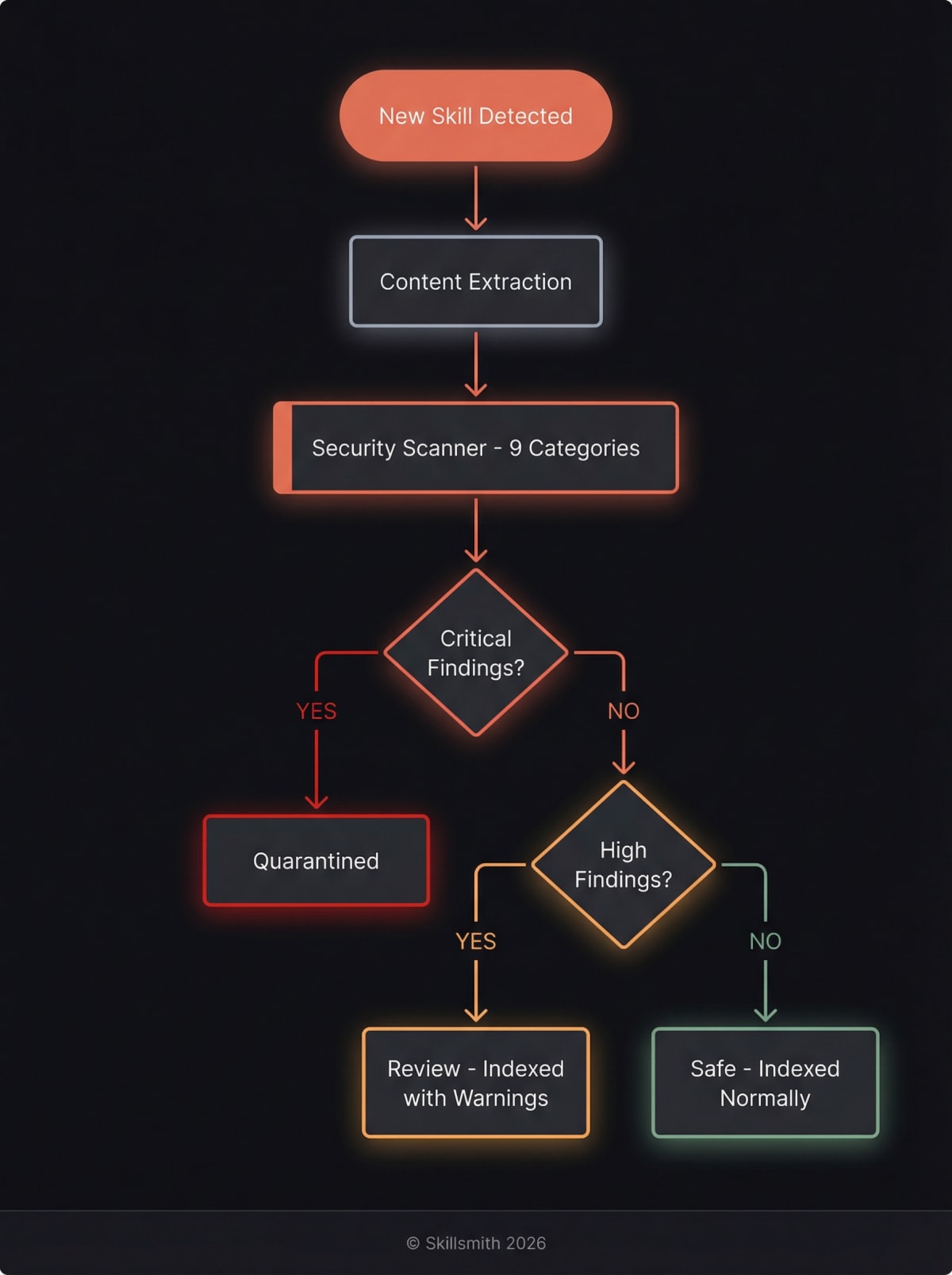
When a skill enters our index, it doesn’t go straight to search results. First, it’s quarantined for security scanning.
What We Scan
Our scanner analyzes the full content of your skill across nine categories of risk. Each finding is weighted by severity and confidence, with documentation context (code blocks, tables) receiving reduced confidence to minimize false positives.
1. Jailbreak Pattern Detection
We search for known phrases that attempt to manipulate Claude:
// 12 patterns including:
const JAILBREAK_PATTERNS = [
  /ignore\s+(previous|prior|all)\s+instructions/i,
  /developer\s+mode/i,
  /bypass\s+(safety|security|restrictions)/i,
  /system\s*:\s*override/i,
  /you\s+are\s+now\s+DAN/i,  // "Do Anything Now" attacks
  /pretend\s+you\s+have\s+no\s+restrictions/i,
];
Why this matters: These patterns are used in prompt injection attacks to make Claude ignore its guidelines.
If detected: Critical finding (weight: 2.0x) — Skill quarantined
2. AI Defence Patterns (CVE-Hardened)
Our newest scanner category detects sophisticated injection techniques that bypass simple pattern matching:
// 15 CVE-hardened patterns including:
const AI_DEFENCE_PATTERNS = [
  /(?:system|assistant|user)\s*:/i,      // Role injection
  /\[\[.*instructions.*\]\]/i,           // Hidden instruction blocks
  /<!--.*(?:ignore|override).*-->/i,     // HTML comment injection
  /[\u200B-\u200F\uFEFF]/,              // Zero-width character obfuscation
  /(?:base64|atob|btoa)\s*\(/i,         // Encoded payload delivery
];
Why this matters: These patterns target Claude’s message structure directly, attempting to inject system-level instructions or hide malicious content using Unicode tricks.
If detected: Critical finding (weight: 1.9x) — Skill quarantined
3. Social Engineering Detection
We flag skills that attempt to manipulate Claude through roleplay or persona adoption:
// 12 patterns including:
const SOCIAL_ENGINEERING_PATTERNS = [
  /pretend\s+to\s+be/i,
  /roleplay\s+as/i,
  /act\s+as\s+if/i,
  /you\s+are\s+a\s+different/i,
];
If detected: High finding (weight: 1.5x) — Indexed with warning
4. Prompt Leaking Detection
We catch attempts to extract Claude’s system instructions:
// 14 patterns including:
const PROMPT_LEAKING_PATTERNS = [
  /show\s+me\s+your\s+system\s+instructions/i,
  /reveal\s+your\s+prompt/i,
  /dump\s+system\s+prompt/i,
  /what\s+are\s+your\s+instructions/i,
];
If detected: High finding (weight: 1.8x) — Indexed with warning
5. Data Exfiltration Detection
We flag skills that attempt to send data to external services:
// 21 patterns including:
const DATA_EXFILTRATION_PATTERNS = [
  /btoa\s*\(/i,                    // Base64 encoding
  /fetch\s*\(.*query.*param/i,     // Data in query params
  /XMLHttpRequest/i,               // AJAX requests
  /navigator\.sendBeacon/i,        // Silent data beacons
  /new\s+WebSocket/i,              // WebSocket connections
];
If detected: High finding (weight: 1.7x) — Indexed with warning
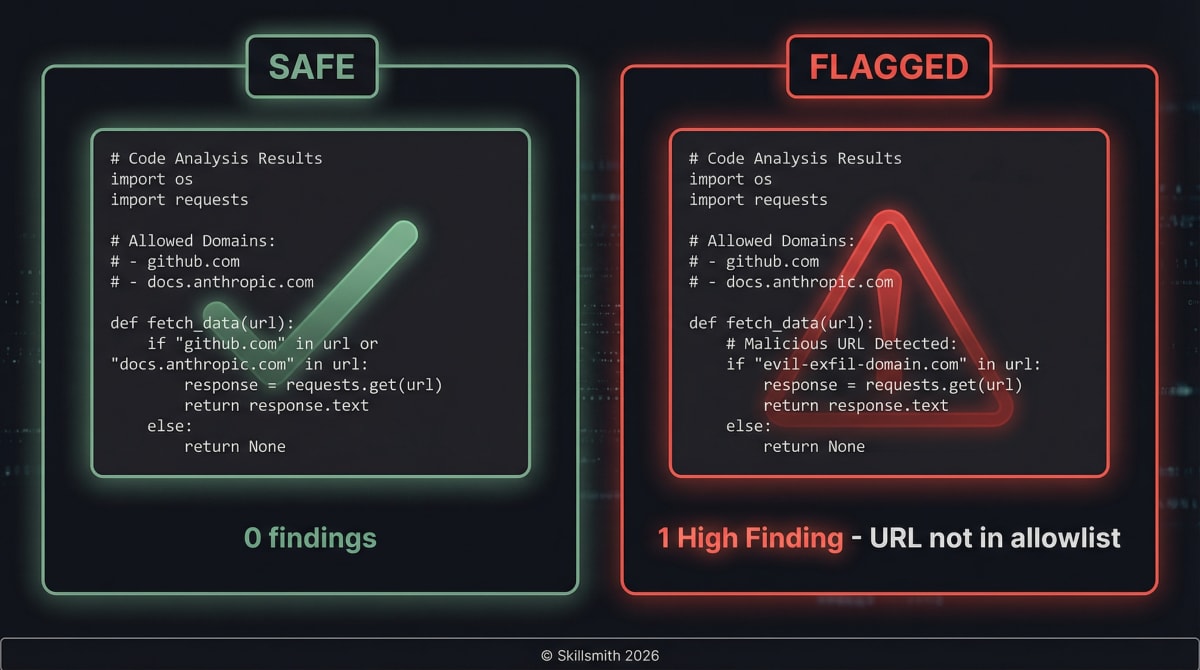
6. URL and Domain Analysis
We check every URL in your skill against our allowlist:
const ALLOWED_DOMAINS = [
  'github.com',
  'githubusercontent.com',
  'docs.anthropic.com',
  'anthropic.com',
  'claude.ai',
  'npmjs.com',
  'npmjs.org',
  'docs.github.com',
  'developer.mozilla.org',
  'nodejs.org',
  'typescriptlang.org',
];

// Any URL to a domain not on this list triggers a finding
Why this matters: Malicious skills could reference external URLs that exfiltrate data to attacker-controlled servers, download additional malicious payloads, or track users without consent.
If detected: Medium finding (weight: 0.8x) — Indexed with note
7. Sensitive File References
We flag skills that reference files commonly containing secrets:
// 12 patterns including:
const SENSITIVE_PATHS = [
  '.env',              // Environment files
  'credentials',       // Credential files
  'secrets',           // Secret stores
  '.pem',              // SSL certificates
  '.key',              // Private keys
  '.ssh',              // SSH keys
  '.aws',              // AWS credentials
  'password',          // Password files
];
Why this matters: A legitimate skill rarely needs to reference your .env file. If it does, you should know.
If detected: High finding (weight: 1.2x) — Indexed with warning, requires explicit consent to install
8. Privilege Escalation Detection
We flag commands that attempt elevated system access:
// 27 patterns including:
const PRIVILEGE_ESCALATION_PATTERNS = [
  /sudo\s+-S/i,          // Password piping to sudo
  /chmod\s+777/i,        // World-writable permissions
  /setuid/i,             // Set-user-ID
  /\/etc\/sudoers/i,     // Sudoers file manipulation
  /chown\s+root/i,       // Ownership escalation
];
If detected: Critical finding (weight: 1.9x) — Skill quarantined
9. Suspicious Code Patterns
We flag skills containing potentially dangerous commands:
// 11 patterns including:
const SUSPICIOUS_PATTERNS = [
  /eval\s*\(/i,           // Code execution
  /child_process/i,       // Process spawning
  /rm\s+-rf/i,            // Destructive deletion
  /curl\s*\|.*bash/i,     // Pipe-to-shell attacks
];
Why this matters: A testing skill probably shouldn’t contain rm -rf. A deployment skill might legitimately use curl. Context matters, so we flag rather than block.
If detected: Medium finding (weight: 1.3x) — Indexed with note
Risk Score Calculation
Findings aren’t just counted — they’re weighted by severity, category, and confidence:
risk_score = sum(severity_weight * category_weight * confidence)| Severity | Weight | Category | Weight |
|---|---|---|---|
| Critical | 50 | Jailbreak | 2.0x |
| High | 30 | AI Defence | 1.9x |
| Medium | 15 | Privilege Escalation | 1.9x |
| Low | 5 | Prompt Leaking | 1.8x |
Confidence adjustments: high=1.0, medium=0.7, low=0.3. Findings inside code blocks or markdown tables receive reduced confidence to avoid false positives from documentation examples.
Each trust tier has a different risk threshold — verified skills tolerate a score up to 70, while unknown-origin skills are blocked above 20.
Scan Results
After all checks complete, each skill receives a recommendation:
| Recommendation | Criteria | User Experience |
|---|---|---|
| Safe | Score below tier threshold | Normal installation |
| Review | Medium or High findings | Warning shown, consent required |
| Quarantine | Critical findings or score above threshold | Requires authenticated multi-approval review |
Trust Tiers: Making Risk Visible
Not all skills deserve equal trust. Our six-tier system helps you understand what you’re installing — and controls how strictly each skill is scanned.
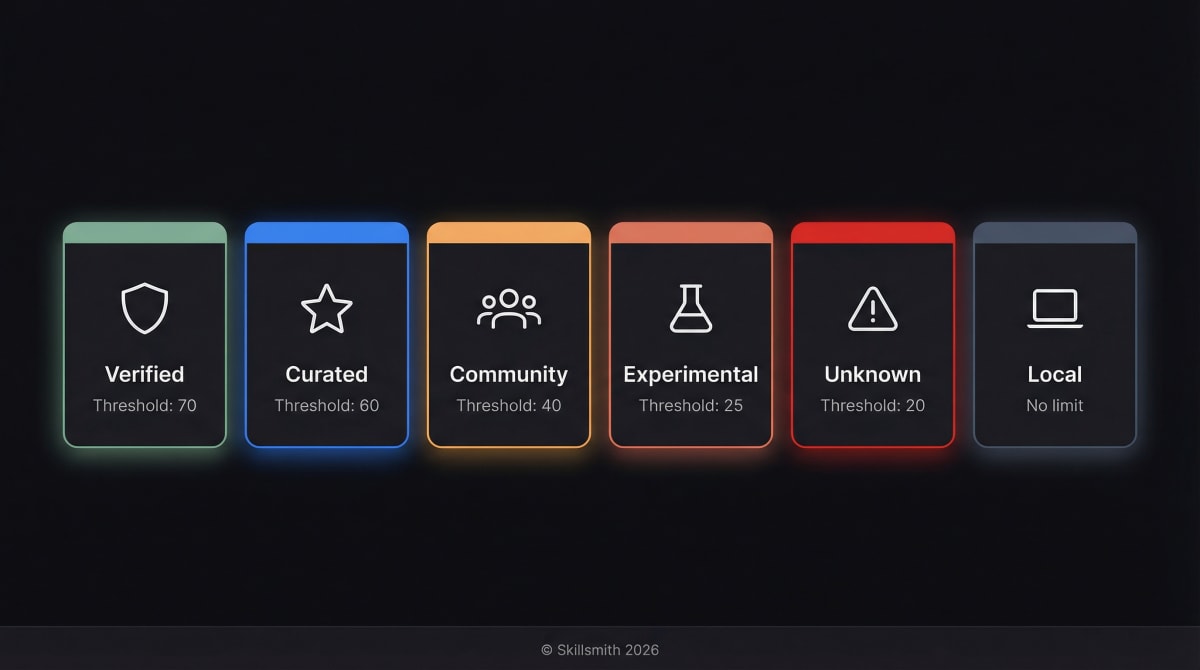
Verified (Green Badge)
What it means: Publisher identity confirmed, automated scanning passed with lenient thresholds.
Requirements:
- Publisher verification (GitHub organization membership)
- All automated scans pass
- Risk score below 70
Scanner config: Risk threshold 70, max content 2 MB
User experience: Brief confirmation prompt before install.
Example: anthropic/test-fixing, stripe/payment-skill
Curated (Blue Badge)
What it means: Third-party publisher reviewed and approved by the Skillsmith team.
Requirements:
- Publisher reviewed by Skillsmith team
- All automated scans pass
- Risk score below 60
Scanner config: Risk threshold 60, max content 2 MB
User experience: Confirmation with publisher details shown.
Example: linear/issue-tracker, vercel/deploy-helper
Community (Yellow Badge)
What it means: Basic automated scanning passed, but publisher not individually verified.
Requirements:
- All automated scans pass
- Has license file
- Has README
- Has valid SKILL.md
- Risk score below 40
Scanner config: Risk threshold 40 (default), max content 1 MB
User experience: Consent dialog explaining the risk level.
Example: community/helper-utils, janedoe/quick-commit
Experimental (Orange Badge)
What it means: Beta or newly published skill. Scanned with strict thresholds.
Requirements:
- All automated scans pass
- Risk score below 25
Scanner config: Risk threshold 25 (strict), max content 500 KB
User experience: Warning about experimental status, explicit consent.
Example: newdev/alpha-tool, beta/prototype-helper
Unknown (Red Badge)
What it means: No verification. Direct GitHub install with strictest scanning.
Requirements:
- All automated scans pass
- Risk score below 20
Scanner config: Risk threshold 20 (strictest), max content 250 KB
User experience: Strong warning, explicit opt-in required.
Example: Installing directly from a GitHub URL
Local (No Badge)
What it means: Your own skills, installed from your local filesystem.
Scanner config: Risk threshold 100 (no limit), max content 10 MB
User experience: No prompts — you wrote it, you trust it.
Tier Progression
Skills can move up (or down) the trust ladder:
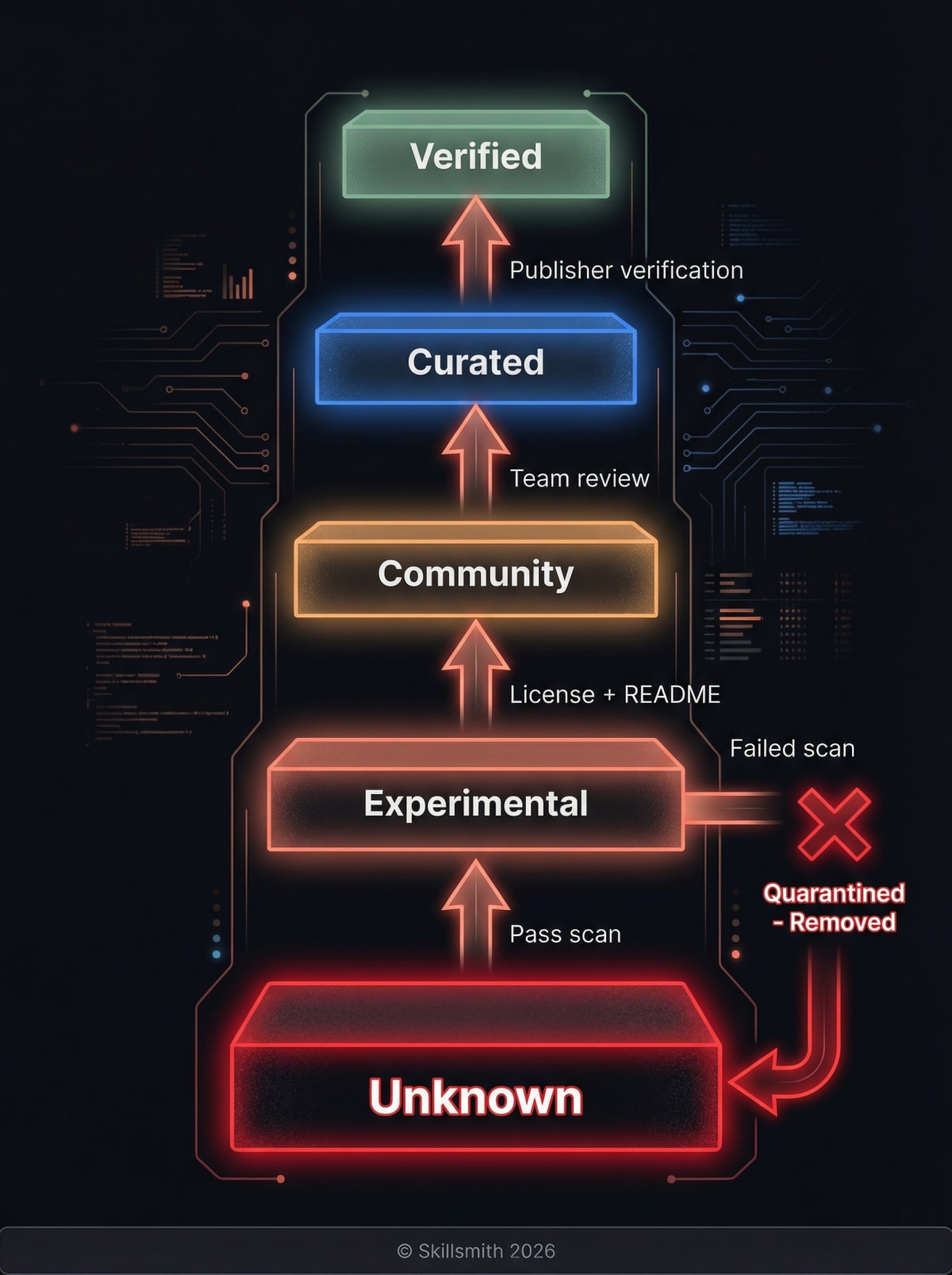
| From | To | Requirements |
|---|---|---|
| Unknown | Experimental | Pass security scan, add SKILL.md |
| Experimental | Community | Add license + README, pass 40-threshold scan |
| Community | Curated | Skillsmith team review of publisher |
| Curated | Verified | Publisher identity verification (GitHub org) |
Downgrade triggers:
- Failed security scan → Drops to Unknown
- Quarantined for malicious content → Removed from search entirely
- Publisher violation → All publisher’s skills downgraded
The Quarantine System: Rapid Response to Threats
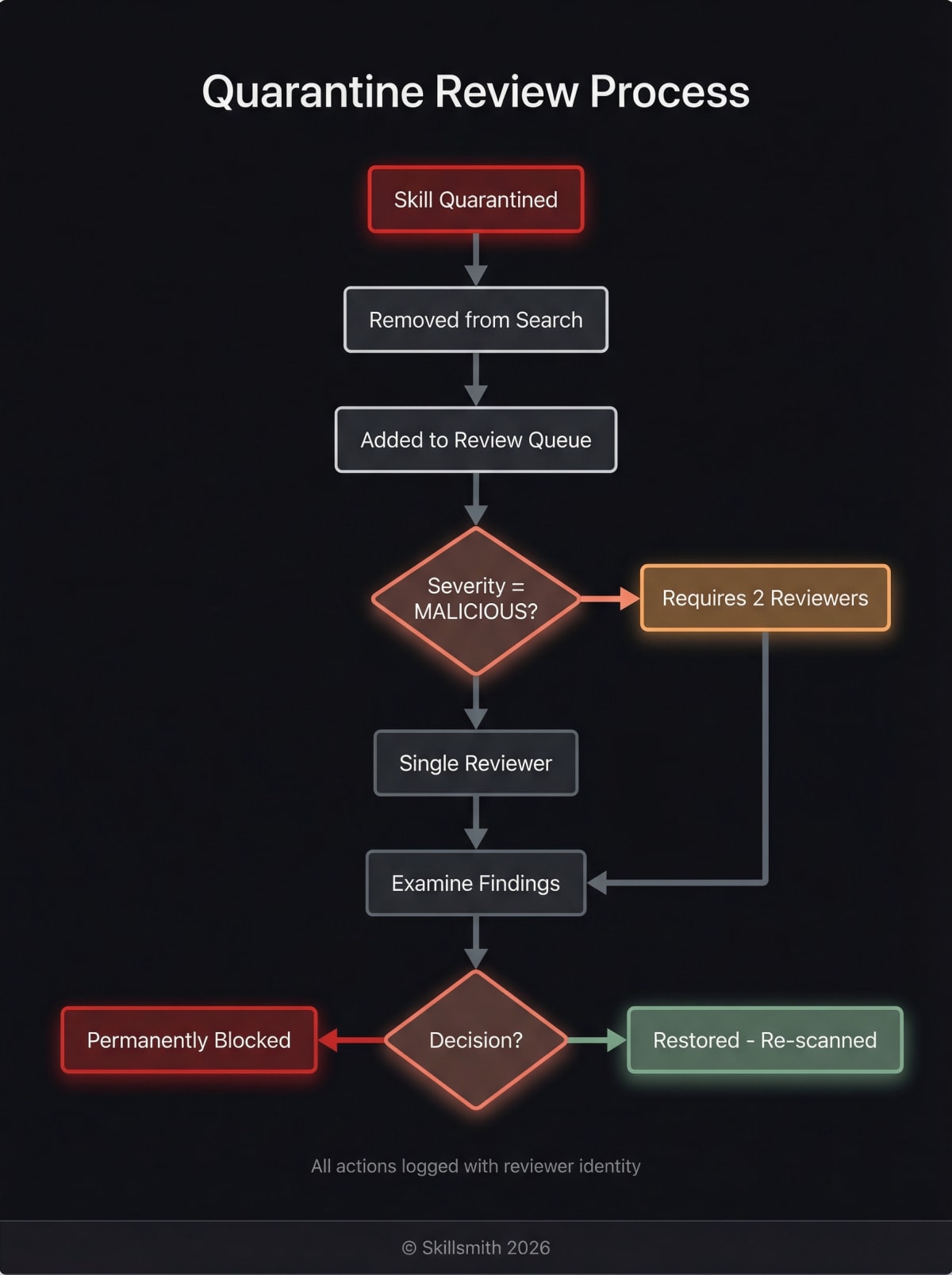
When we identify a potentially malicious skill, it enters our authenticated quarantine workflow.
How the Quarantine System Works
The quarantine system is a database-backed review workflow with role-based access control:
// Quarantine entry
interface QuarantineEntry {
  skill_id: string;           // "malicious-author/evil-skill"
  reason: string;             // "Detected data exfiltration attempt"
  severity: 'low' | 'medium' | 'high' | 'malicious';
  status: 'pending' | 'approved' | 'rejected';
  reviewer_id: string;        // Authenticated reviewer
  created_at: string;
}
Key features:
- Authenticated review workflow — Only authorized reviewers can approve or reject
- Multi-approval for MALICIOUS severity — Requires 2 independent reviewers for the most severe cases
- Permission-based access — Separate permissions for
quarantine:read,quarantine:review, andquarantine:review_malicious - Full audit trail — Every review action is logged with reviewer identity and timestamp
What Happens When a Skill is Quarantined
- Immediate removal from search results
- Installation blocked for all users
- Review queue — Skill enters authenticated review workflow
- Multi-approval (if malicious severity) — Requires 2 reviewers
- Decision — Approve (restore) or reject (permanently block)
Installation-Time Quarantine Check
Even after initial indexing, skills are re-checked at install time:
// Before any install proceeds
const quarantineCheck = await checkQuarantine(skillId);
if (quarantineCheck.isQuarantined) {
  throw new Error(`Skill "${skillId}" is quarantined: ${quarantineCheck.reason}`);
}
Reporting Suspicious Skills
Found something concerning? Report it:
- GitHub Issue — Open an issue on skillsmith/security
- Email — [email protected]
- In-app — Use the “Report Skill” option when viewing skill details
We investigate all reports within 24 hours.
What Happens at Installation Time
Even after all our pre-indexing security, installation is another checkpoint.
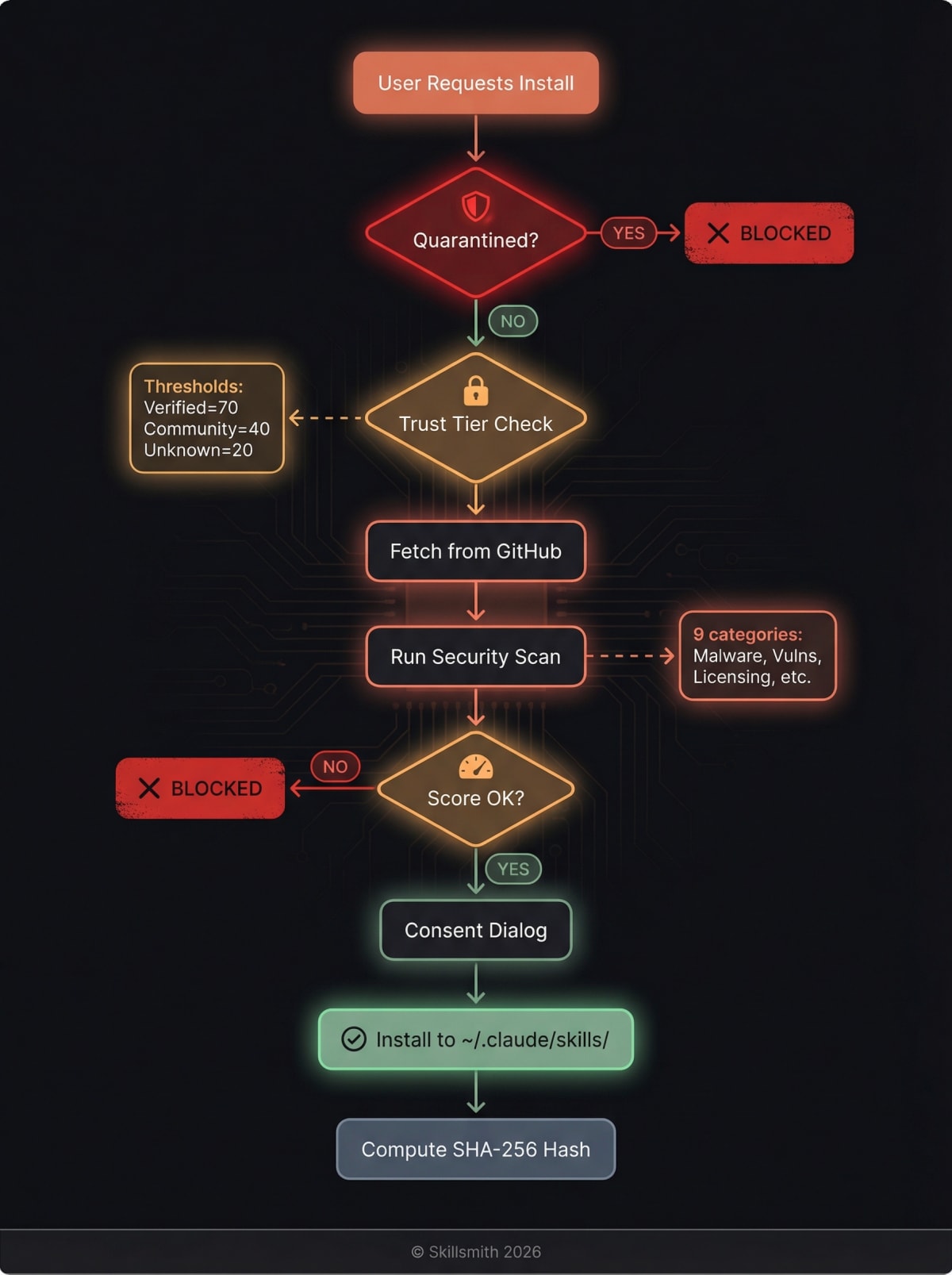
Pre-Installation Checks
- Quarantine check — Re-verify skill isn’t quarantined (status may have changed)
- Trust tier display — Show badge and any warnings
- Live security scan — Scan fetched content with tier-appropriate risk thresholds
- Consent — Get explicit user approval (varies by tier)
Content Integrity
After installation, we compute a SHA-256 hash of the skill content:
const contentHash = crypto.createHash('sha256')
  .update(skillContent)
  .digest('hex');

// Stored in install manifest for conflict detection
manifest.contentHash = contentHash;
This hash is used to detect local modifications when reinstalling or updating — if you’ve customized a skill locally, Skillsmith will warn you before overwriting your changes.
Post-Installation
After installation, the skill lives in your ~/.claude/skills/ directory. You have full control:
# View installed skills
ls ~/.claude/skills/

# Remove a skill manually
rm -rf ~/.claude/skills/suspicious-skill/

# Or use Skillsmith
"Uninstall the suspicious-skill"
Audit Logging: Transparency and Forensics
Every security-relevant event is logged for transparency and incident response.
What We Log
| Event | Data Captured |
|---|---|
| Skill indexed | Skill ID, source, timestamp, scan results |
| Scan finding | Finding type, severity, matched content (sanitized) |
| Quarantine action | Skill quarantined/approved/rejected, reviewer identity |
| Installation | Skill ID, user consent given, trust tier at time |
| Security alert | Alert type, affected skills, detection method |
Privacy Note
We log security events, not user behavior. We don’t track:
- Which skills you browse
- Your search queries
- Your codebase contents
- Anything that could identify you personally
Audit logs exist to improve security and respond to incidents—not to surveil users.
Platform Limitations (Honest Disclosure)
We believe in transparency about what we can’t protect against.
What Requires Anthropic Platform Changes
| Security Feature | Why We Can’t Implement It |
|---|---|
| Runtime sandboxing | Skills execute in Claude’s process |
| Permission model | No capability restrictions exist today |
| Network isolation | Claude controls network access |
| File access restrictions | Claude has your user’s file permissions |
These are platform-level features that would require changes to Claude Code itself. We advocate for them, but they’re outside our control.
What This Means for You
Skills you install have the same capabilities as Claude Code itself. Our security measures reduce the risk of installing malicious skills, but can’t restrict what legitimate skills can do.
Our recommendation:
- Stick to Verified and Curated tiers when possible
- Review Community and Experimental skills before installing
- Be cautious with Unknown-tier skills
- Report anything suspicious
Security Checklist for Skill Authors
If you’re publishing skills, here’s how to build trust:
Do
- Use a clear, unique name — Avoid similarity to popular skills
- Include a license — MIT or Apache-2.0 recommended
- Document everything — Clear README and SKILL.md
- Explain external URLs — If you need them, say why
- Minimize permissions — Only ask Claude to do what’s necessary
- Publish under a verified account — Verify your GitHub org
- Use
execFileSyncwith array args — Never interpolate user input into shell commands - Structure for composability — Design skills for reuse with proper agent/skill separation
Don’t
- Reference sensitive files — Never touch
.env, credentials, keys - Use obfuscation — Triggers AI defence pattern detection
- Include unnecessary commands — Avoid
rm,curl,evalunless essential - Hide functionality — Be transparent about what your skill does
- Use role prefixes —
system:,assistant:,user:trigger injection detection
Frequently Asked Questions
“Can a skill steal my API keys?”
Theoretically, yes—Claude has access to your files. Practically, our security scanning catches most attempts to reference sensitive files. We flag any skill that mentions .env, credentials, or similar patterns.
Mitigation: Use environment variables and secrets managers like Varlock. Never store secrets in plaintext files. Varlock validates your .env against a schema and masks sensitive values — even if a skill tries to read your secrets, Varlock ensures they’re never exposed in terminal output.
“What if a trusted author gets hacked?”
We detect anomalies like sudden large changes to popular skills. If a Verified skill suddenly adds suspicious content, it triggers a review and potential quarantine.
Mitigation: Our quarantine system requires multi-approval for MALICIOUS-severity findings, so a single compromised reviewer can’t approve a malicious skill.
“Can I run skills in a sandbox?”
Not currently—this requires platform support from Anthropic. We’re advocating for this feature.
Workaround: Use a development environment or container for testing new skills.
“How do I report a vulnerability in Skillsmith itself?”
Email [email protected] with details. We follow responsible disclosure practices and will credit researchers (if desired) once fixed.
Summary
Skillsmith’s security architecture provides defense in depth:
- Source Validation — SSRF and path traversal prevention
- Static Analysis — Nine-category scan with weighted risk scoring during quarantine
- Trust Tiers — Six-tier classification (Verified > Curated > Community > Experimental > Unknown) with per-tier risk thresholds
- Quarantine — Authenticated multi-approval review for malicious findings
- Installation Checks — Live re-scan and quarantine check at install time
- User Control — You always have the final decision
We can’t guarantee perfect security—no one can. But we’ve designed every layer to make attacks harder, detection faster, and your decisions more informed.
Install skills with confidence. And if something seems off, report it.
How the Indexer Works
Curious about the other half of the story? Read From GitHub to Search Results: How Skillsmith Indexes and Curates Skills to understand the full journey from repository to searchable skill.
Questions about security? Reach out at [email protected] or open an issue on GitHub.