From GitHub to Search Results: How Skillsmith Indexes and Curates Skills
A behind-the-scenes look at how Skillsmith discovers, scores, and indexes agent skills—and how to optimize your skills for discovery
Updated: May 1, 2026
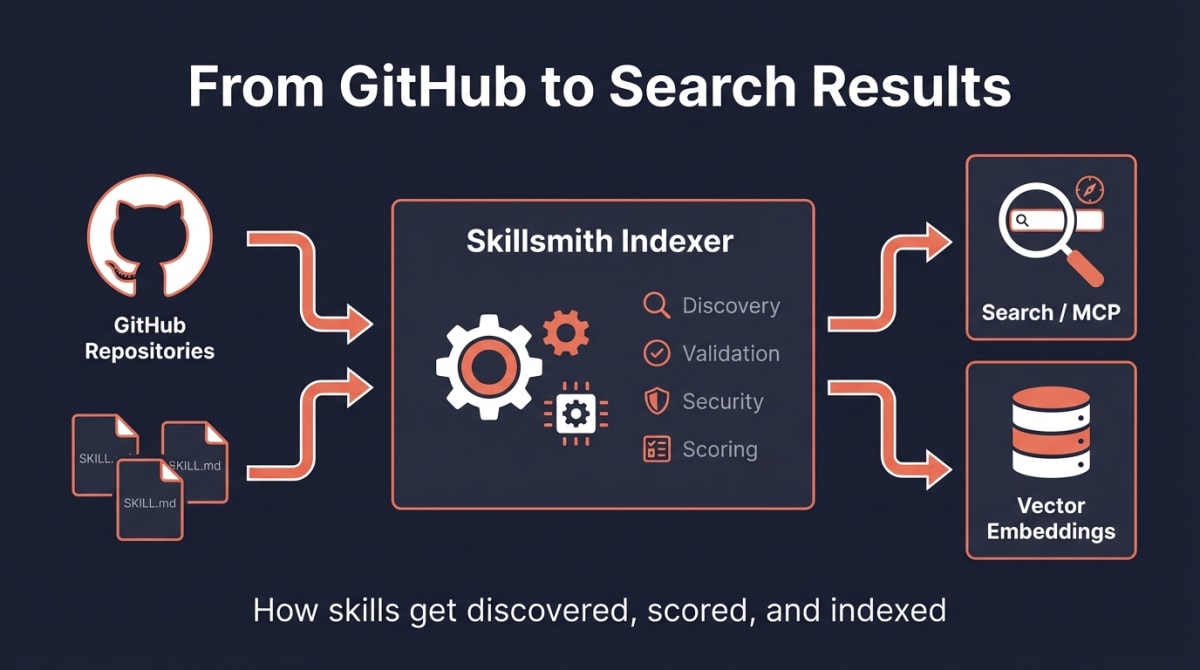
You’ve built an agent skill (a SKILL.md-format file that works with any MCP-compatible agent — Claude Code, Cursor, Copilot, Codex, Windsurf, and others). It works great locally. But how does it get discovered by the thousands of developers searching for skills like yours?
This guide walks you through Skillsmith’s indexing pipeline—from the moment we discover your skill on GitHub to when it appears in search results. Understanding this process helps you optimize your skills for discovery and explains why some skills rank higher than others.
The Big Picture
Before diving into details, here’s what happens when Skillsmith indexes a skill:
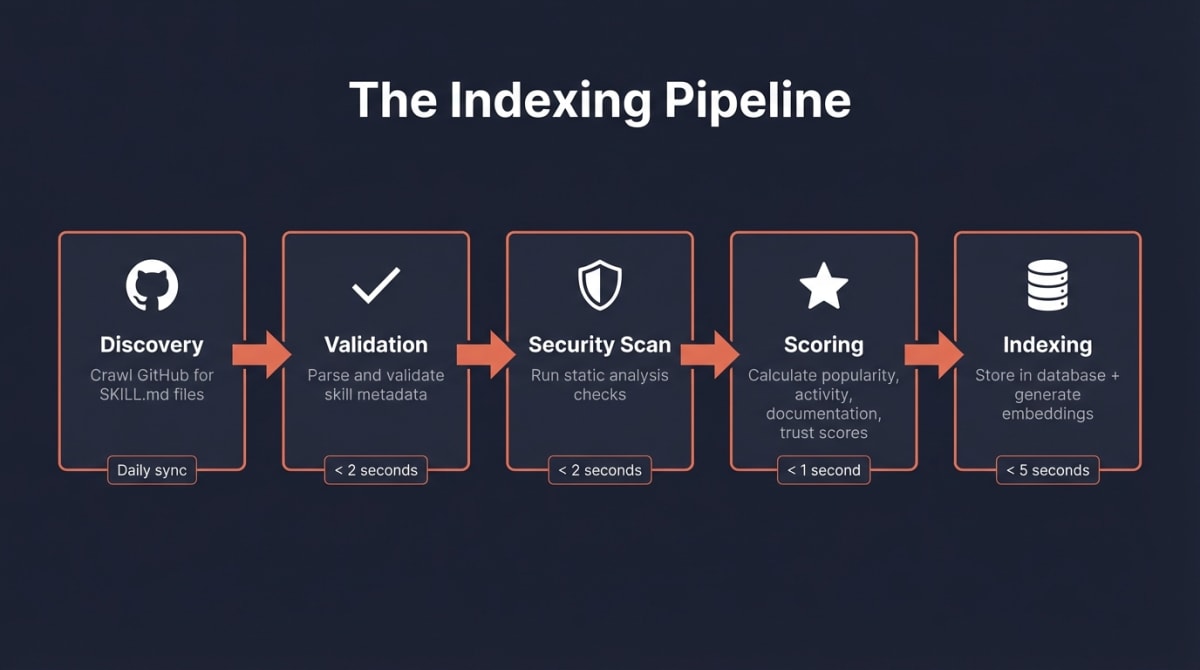
The journey in five steps:
- Discovery — We crawl GitHub daily, looking for repositories with
SKILL.mdfiles - Validation — We parse your skill’s metadata and verify it meets our schema
- Security Scan — We run static analysis to detect potential security issues
- Scoring — We calculate quality, popularity, and maintenance scores
- Indexing — We store everything in our database and generate semantic embeddings
The entire process takes seconds per skill, but we’ve designed each step carefully to balance speed with accuracy.
Step 1: Discovery — Finding Skills in the Wild
Skillsmith doesn’t wait for you to submit your skill. We actively search for skills across GitHub.
What We Look For
Our GitHub indexer searches for repositories containing:
- A
SKILL.mdfile in the root or.claude/skills/directory - Valid YAML frontmatter with required fields
- Public visibility (we don’t index private repos)
// Simplified view of our search query
const SEARCH_QUERIES = [
  'filename:SKILL.md path:.claude/skills',
  'filename:SKILL.md "claude" "skill"',
  'topic:claude-skill',
  'topic:claude-code-skill',
];
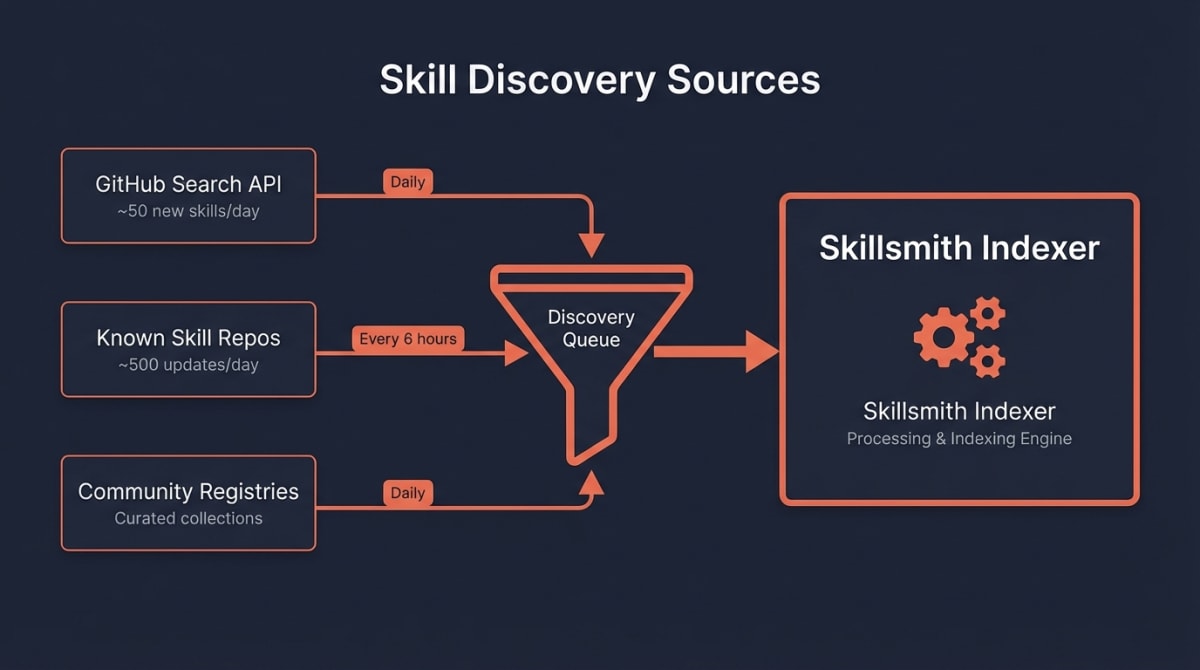
The Crawl Schedule
| Source | Frequency | Coverage |
|---|---|---|
| GitHub Search API | Daily | New skills, trending repos |
| Known skill repos | Every 6 hours | Updates to existing skills |
| Community registries | Daily | Curated skill collections |
How to Get Discovered Faster
Want your skill indexed sooner? Here’s what helps:
- Add the
claude-skilltopic to your GitHub repository - Use a descriptive repository name that includes “skill” or “claude”
- Ensure your
SKILL.mdis in a standard location (root or.claude/skills/)
Step 2: Validation — Parsing Your Skill
Once we find a potential skill, we validate its structure. This isn’t just bureaucracy—proper metadata makes your skill searchable and trustworthy.
Required Frontmatter
Your SKILL.md must include YAML frontmatter with these fields:
---
name: "my-awesome-skill"
description: "A brief description of what this skill does"
author: "your-github-username"
---
Note:
authoranddescriptionhave auto-fix fallbacks — ifauthoris missing, the indexer infers it from the repository URL. Ifdescriptionis missing, it falls back to the skill name. But providing both explicitly is strongly recommended.
Optional But Recommended
These fields improve your skill’s discoverability and ranking:
---
name: "my-awesome-skill"
description: "A brief description of what this skill does"
author: "your-github-username"
version: "1.0.0"

# Recommended fields
tags: ["testing", "react", "automation"]
category: "development"
triggers:
  - "when I ask about testing"
  - "when working with React components"
examples:
  - "Help me write tests for this component"
  - "Set up Jest configuration"
---
What Happens on Validation Failure
If your skill fails validation, it enters a “pending” state:
| Issue | Result | How to Fix |
|---|---|---|
Missing name |
Not indexed | Add name to frontmatter |
Missing description |
Not indexed | Add description (min 10 chars) |
| Invalid YAML | Not indexed | Check YAML syntax |
| Empty SKILL.md body | Indexed with warning | Add content below frontmatter |
We don’t penalize you for validation issues—we simply can’t index what we can’t parse. Fix the issue, and we’ll pick it up on the next crawl.
Step 3: Security Scan — Building Trust
Every skill passes through our security scanner before indexing. This protects users and determines your skill’s trust tier.
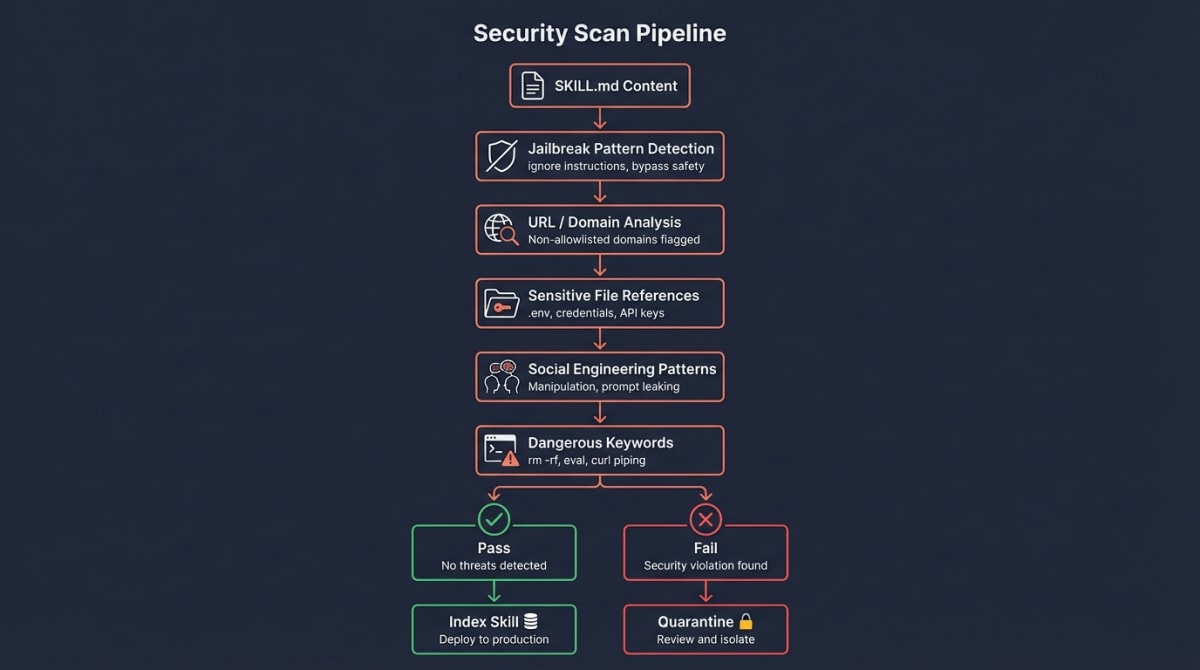
What We Scan For
| Check | What It Detects | Severity |
|---|---|---|
| Jailbreak patterns | “Ignore previous instructions”, “bypass safety” | Critical |
| Suspicious URLs | Links to non-allowlisted domains | High |
| Sensitive file access | References to .env, credentials, keys |
High |
| High entropy content | Possible obfuscated/encoded payloads | Medium |
| Dangerous keywords | rm -rf, eval, curl to unknown hosts |
Medium |
The Allowlist
We maintain an allowlist of trusted domains. URLs pointing elsewhere get flagged:
const ALLOWED_DOMAINS = [
  'github.com',
  'githubusercontent.com',
  'anthropic.com',
  'claude.ai',
  // Community-verified domains added over time
];
Scan Results
After scanning, your skill receives a recommendation:
- Safe — No issues detected, proceeds to indexing
- Review — Minor issues flagged, indexed with warnings
- Block — Critical issues detected, not indexed
Note: A “Review” result doesn’t prevent indexing—it adds context for users deciding whether to install your skill. See our Security Blog for details on trust tiers.
Step 4: Scoring — How We Rank Skills
Not all skills are equal. Our scoring algorithm balances three factors to surface the best skills first.
The Formula
Our scoring algorithm balances four categories, each contributing to a final score out of 100:
Final Score = Popularity (30) + Activity (25) + Documentation (25) + Trust (20)
Popularity Score (30 points)
Community signals matter:
| Factor | Points | What We Check |
|---|---|---|
| GitHub stars | 15 | Logarithmic normalization (10 stars = 0.25, 100 = 0.50, 1000 = 0.75) |
| Forks | 10 | Logarithmic normalization |
| Watchers | 5 | Repository watchers |
We use logarithmic normalization so a skill with 100 stars isn’t crushed by one with 10,000—both can rank well.
Activity Score (25 points)
Active maintenance signals reliability:
| Factor | Points | Scoring |
|---|---|---|
| Recency | 10 | Updated in last 30 days = 1.0, 90 days = 0.8, 180 days = 0.5 |
| Issue health | 5 | Responsiveness to issues |
| Contributors | 5 | Number of active contributors |
| Recent activity | 5 | Commit frequency in recent period |
Documentation Score (25 points)
We assess the craftsmanship of your skill:
| Factor | Points | What We Check |
|---|---|---|
| SKILL.md quality | 10 | Length, structure, description clarity |
| README quality | 5 | Sections, code examples, installation guide |
| Description clarity | 5 | Clear, searchable description |
| Content quality | 5 | Examples, usage patterns |
Pro tip: A well-written SKILL.md with clear descriptions and examples can significantly boost your documentation score.
Trust Score (20 points)
| Factor | Points | What We Check |
|---|---|---|
| License | 8 | MIT, Apache-2.0, etc. |
| Verified owner | 7 | Known/verified GitHub account |
| Topics | 5 | Relevant GitHub topics (claude-skill, etc.) |
Example Score Breakdown
Here’s how a real skill might score:
Skill: community/react-test-helper

Popularity:    22/30 (85 stars, 12 forks, 8 watchers)
Activity:      23/25 (updated 5 days ago, active commits, responsive)
Documentation: 19/25 (good SKILL.md, has examples, clear description)
Trust:         15/20 (MIT license, topics set, not yet verified)

Final: 22 + 23 + 19 + 15 = 79/100

Trust Tier: Community (score > 40, scan passed)
Step 5: Indexing — Making Skills Searchable
The final step stores your skill in our database and makes it searchable through two complementary systems.
Dual Search Architecture
We combine traditional keyword search with semantic understanding:
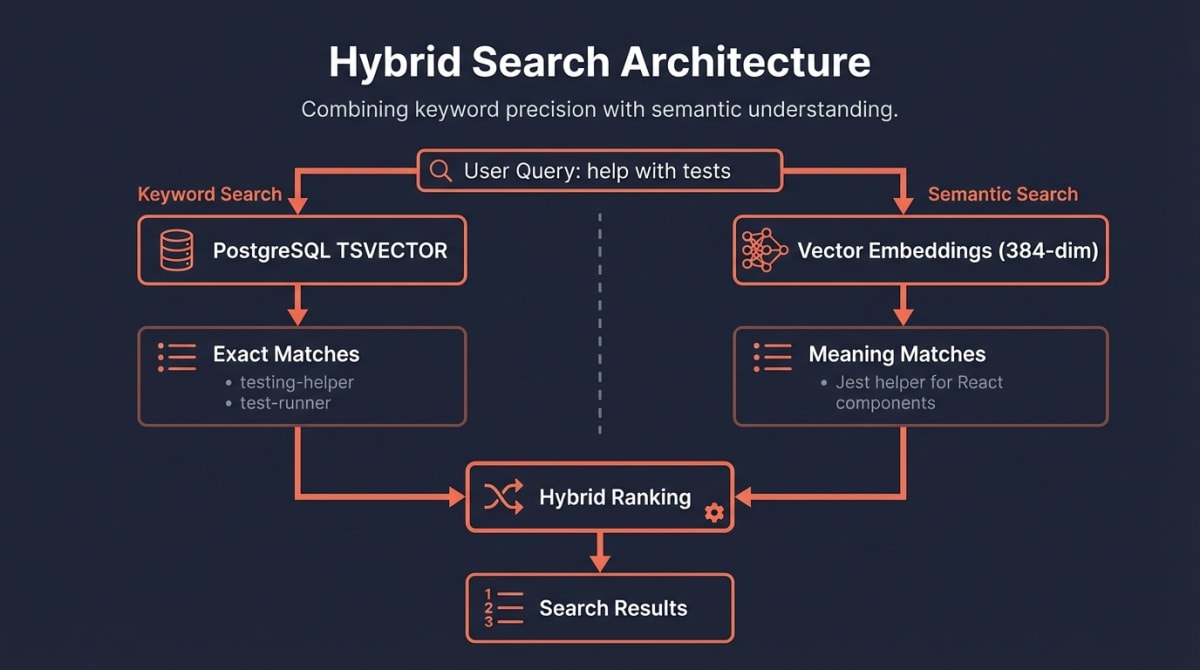
Keyword Search (PostgreSQL Full-Text Search)
We use PostgreSQL’s built-in full-text search with weighted vectors for ranked matching:
-- Auto-generated search vector with weighted fields
search_vector TSVECTOR GENERATED ALWAYS AS (
  setweight(to_tsvector('english', COALESCE(name, '')), 'A') ||
  setweight(to_tsvector('english', COALESCE(description, '')), 'B') ||
  setweight(to_tsvector('english', COALESCE(author, '')), 'C')
) STORED;

-- GIN index for fast lookups
CREATE INDEX idx_skills_search ON skills USING GIN(search_vector);
Name matches rank highest (weight A), then description (B), then author (C). When someone searches “react testing”, we find skills with those exact words—and rank name matches above description matches.
Semantic Search (Vector Embeddings)
But what if someone searches “help me write component tests”? That’s where embeddings shine.
We generate a 384-dimensional vector for each skill using the all-MiniLM-L6-v2 model:
// Simplified embedding generation
const embedding = await embeddingService.embed(
  `${skill.name} ${skill.description}`
);

// Store for similarity search
await db.storeEmbedding(skill.id, embedding);
When you search, we:
- Generate an embedding for your query
- Find skills with similar embeddings (cosine similarity)
- Combine with keyword results for final ranking
The Skill Record
Here’s what we store for each indexed skill:
interface IndexedSkill {
  // Identity
  id: string;              // "author/skill-name"
  name: string;
  description: string;
  author: string;
  repo_url: string;

  // GitHub metrics
  stars: number;
  forks: number;
  license: string;
  updated_at: string;

  // Computed scores
  quality_score: number;
  popularity_score: number;
  maintenance_score: number;
  final_score: number;

  // Trust and security
  trust_tier: 'verified' | 'community' | 'experimental' | 'unknown';
  security_scan_status: 'passed' | 'review' | 'blocked';

  // Search
  embedding_id: number;    // Link to vector embedding
  indexed_at: string;
}
How to Optimize Your Skill for Discovery
Now that you understand the pipeline, here’s a checklist for maximizing your skill’s visibility:
The Essentials
- Add
claude-skilltopic to your GitHub repo - Write a clear description (50+ characters) in your frontmatter
- Include relevant tags that match common search terms
- Add a license (MIT or Apache-2.0 recommended)
Quality Boosters
- Write examples in your SKILL.md showing real usage
- Add a comprehensive README with installation and usage sections
- Include tests to demonstrate reliability
- Use trigger phrases that match how users naturally ask for help
Maintenance Signals
- Commit regularly (even small improvements count)
- Respond to issues within a week when possible
- Keep dependencies updated to show active maintenance
Semantic Optimization
Think about how developers search:
# Instead of:
description: "A skill for tests"

# Write:
description: "Helps write Jest unit tests for React components with mocking and snapshot testing support"
The second description will match searches for: “Jest”, “React”, “unit tests”, “mocking”, “snapshots”, and semantic queries like “help me test my components.” For guidance on structuring your skill for composability and reuse, see our decision framework for agents and skills.
What Happens After Indexing
Once indexed, your skill:
- Appears in search results — Users can find it via the MCP
searchtool - Gets a detail page — The
get_skilltool shows full metadata - Can be installed — Users install via
install_skill - Receives ongoing updates — We re-index every 6 hours for changes
Monitoring Your Skill
You can verify your skill’s index status:
"Check if my skill community/my-skill is indexed"Claude will use the get_skill tool to show your current scores and trust tier.
Summary
Skillsmith’s indexer transforms your GitHub repository into a discoverable, searchable skill through five stages:
- Discovery — Daily GitHub crawls find your SKILL.md
- Validation — We parse and verify your frontmatter
- Security Scan — Static analysis builds trust
- Scoring — Quality + Popularity + Maintenance = Final Score
- Indexing — SQLite + embeddings enable hybrid search
The best way to rank higher? Build a genuinely useful skill, document it well, and maintain it actively. The algorithm rewards exactly what users want: quality, popularity, and reliability.
Have questions about indexing? Open an issue on GitHub or reach out to the team.