Inside the Local Skill Database: How Skillsmith Searches Without Sending Your Queries to a Server
A tour of Skillsmith's embedded SQLite cache, the FTS5 search path, opt-in semantic search, and the differential sync algorithm — what's stored, what isn't, and why.
TL;DR
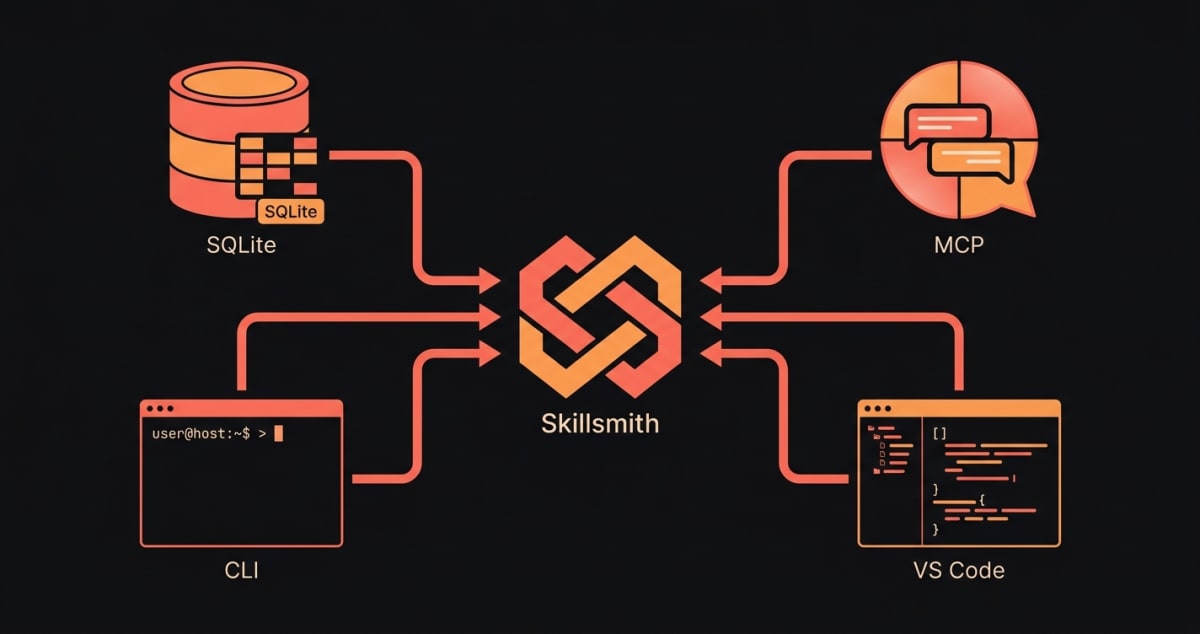
When you run a Skillsmith search through the MCP server, the CLI, or the VS Code extension, the query never leaves your machine. Skillsmith caches the registry locally in a single SQLite database at ~/.skillsmith/skills.db. By default, search runs against an FTS5 full-text index over that cache. There is no vector virtual table in the default schema — semantic search is opt-in (SKILLSMITH_USE_HNSW=true) and uses an in-memory vector index over local ONNX embeddings. skillsmith sync keeps the cache fresh by pulling only the rows that changed since the last sync. This post walks through what’s stored, what isn’t, and why we made each choice.
A quick orientation before we go deep: MCP (Model Context Protocol) is the standard agents use to talk to external tools — Claude Code, Cursor, Copilot, Codex, Windsurf and others all speak it. FTS5 is SQLite’s built-in full-text search module: tokenize text, build an inverted index, rank results, all inside the database file with no external service. HNSW (hierarchical navigable small world) is a graph index that makes vector search fast by checking only a small fraction of the dataset per query. ONNX (Open Neural Network Exchange) is a portable ML model format with a runtime that runs inference on CPU — no GPU, no API call. We’ll explain the rest as they come up.
Jump to: Where the DB lives · Schema tour · FTS5 default · Semantic search · sync · import-local · Tradeoffs
Two posts, two halves
This post is the client-side companion to “From GitHub to Search Results: How Skillsmith Indexes and Curates Skills”, which covers the server side — how we discover skills on GitHub, validate them, run security scans, score them, and ship them to the registry. If you want to know how a skill gets into the registry, read that one. If you want to know what happens after the registry hands a skill back to your machine — what’s cached, how search works, what sync actually does — keep reading here. Both posts are useful in isolation; together they cover end-to-end discovery.
Where the DB lives
Skillsmith installs a single SQLite database at ~/.skillsmith/skills.db. The path is overridable via the SKILLSMITH_DB_PATH environment variable, which is mostly useful in CI or for keeping per-project caches.
The database is shared across all three Skillsmith surfaces:
- The MCP server (
@skillsmith/mcp-server) opens it on startup so tools likesearch,get_skill,install_skill, andskill_recommendcan return results without an API round-trip. - The CLI (
skillsmithorsklx) reads and writes the same file — the path constant lives inpackages/cli/src/config.ts:14and the MCP equivalent is inpackages/mcp-server/src/context.helpers.ts:46. - The VS Code extension uses it transitively: it spawns the MCP server in the background and routes everything through that subprocess, so its sidebar and quick-pick share state with whatever the CLI last synced.
The file is created on first run by createDatabaseAsync() → initializeSchema() (packages/core/src/db/schema.ts:54). After that, you can poke at it directly with sqlite3 ~/.skillsmith/skills.db and write your own queries — it’s just SQLite.
Schema tour
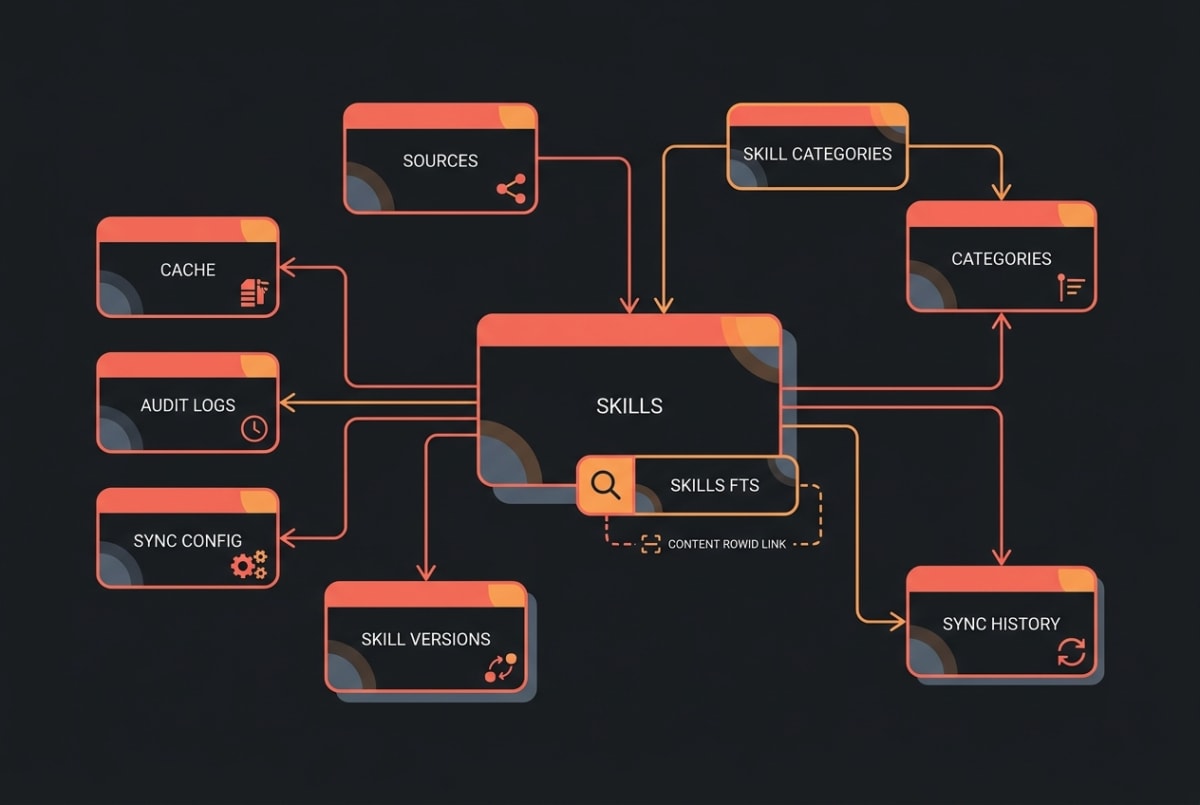
The schema is currently at version 13 and lives in two places. The initial tables are declared in packages/core/src/db/schema-sql.ts:
skills— one row per skill (id,name,description,author,repo_url,quality_score,trust_tier,tags,risk_score,security_scanned_at,content_hash, timestamps).skills_fts— an FTS5 virtual table that mirrorsname,description,tags, andauthorfor full-text search. Triggers keep it in sync withskillson insert/update/delete.sources,categories,skill_categories— registry source provenance and taxonomy.cache— small key-value cache for things like rate-limit windows and last-fetched timestamps.audit_logs— local audit trail for installs, removes, and config changes.
Add-on tables come from migrations:
sync_configandsync_historyship inv3-sync-tables.ts— they record the last sync timestamp and a row per sync run with status, started/finished times, and counts.skill_versionsships inv5-skill-versions.ts— one row per(skill_id, version_hash)so we can cheaply detect “this skill changed” on subsequent syncs.
Notably absent: there is no vec_* or vss_* virtual table in the default schema. We don’t ship sqlite-vec or sqlite-vss. Vector search, when it’s enabled, lives outside SQL — more on that below.
FTS5 — the default search path
When you search Skillsmith, the default path runs in three steps: tokenize your query, hand it to the FTS5 virtual table, and join the BM25-ranked rowids back to skills for the full row. (BM25 is a standard relevance algorithm — it weighs how often a term appears against how common it is, so an exact match on a skill’s name beats a paragraph that mentions the word once.) That’s it. No HTTP, no embedding model, no graph traversal — just SQLite’s built-in full-text engine.
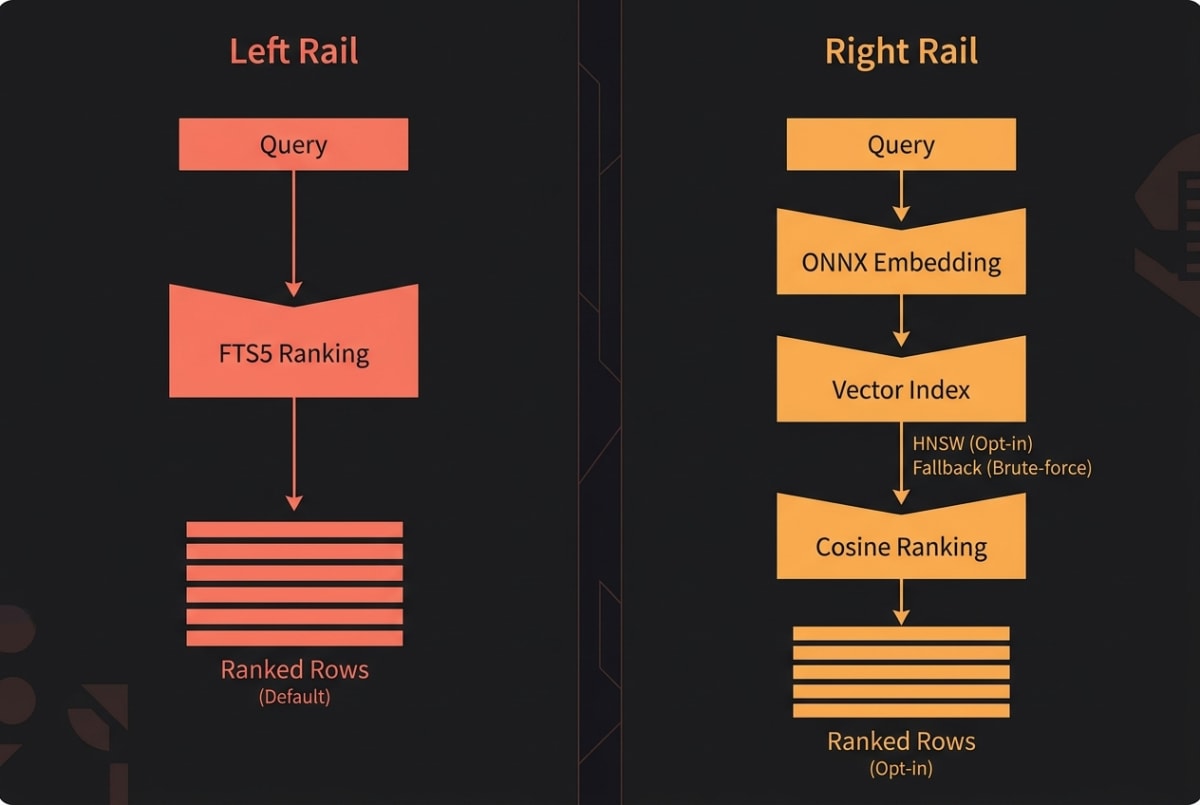
The FTS5 ranking weights name and tags higher than description and author, so an exact match on a skill’s name floats to the top even when the description is sprawling. BM25 handles term frequency and inverse document frequency, so common words like “skill” or “test” don’t dominate the ranking just because they appear everywhere. For most queries — name lookups, tag filters, “find anything mentioning playwright” — this is the right tool.
A nice side effect of doing search locally: it’s basically free latency-wise. Typical FTS5 query times against the full registry cache are sub-millisecond, which means the whole search-to-render cycle in your editor or chat is dominated by network calls you didn’t make (because you’re hitting your own disk).
There’s a small footnote: native better-sqlite3 is the default driver, but if its prebuilt binary fails to load (Node ABI mismatch after a Node upgrade is the usual cause), Skillsmith automatically falls back to a WASM SQLite build via fts5-sql-bundle. The user-visible behavior is identical; the only difference is a small startup cost the first time the WASM module loads. The fallback policy is deterministic: real ONNX embeddings when the runtime is available, and a stable mock embedding otherwise.
Semantic search — opt-in
FTS5 is great for keyword queries. It’s not great when you ask “I want a skill that helps me write tests for React components” and the best match is named vitest-component-harness with no exact-keyword overlap. For that, you want semantic search.
Skillsmith ships semantic search as opt-in behind SKILLSMITH_USE_HNSW=true. When enabled:
- Skills are embedded with
Xenova/all-MiniLM-L6-v2via ONNX Runtime — a small sentence-transformer model (22M parameters, produces 384-dim vectors, q8-quantized to ~25 MB on disk; the q8 part means weights are stored as 8-bit integers — about a quarter the size of full precision with negligible accuracy loss for sentence embeddings). The model runs locally on CPU; no API call. - For testing or development, you can swap the real model for a deterministic mock via
SKILLSMITH_USE_MOCK_EMBEDDINGS=true. The mock is sub-millisecond and produces stable vectors — useful for test fixtures. - Embeddings are cached in a
skill_embeddingsBLOB column inside SQLite, so we don’t re-embed the entire registry on every cold start. - Search itself happens in process: queries are embedded the same way, then compared against cached vectors. The fast path uses an HNSW index (hierarchical navigable small world graph —
hnswlib-node) that returns the top-k matches inO(log n)per query; persisted to~/.skillsmith/cache/hnsw-*.binand rebuilt incrementally as the registry changes. The ranking metric is cosine similarity (how aligned two vectors point in space — equivalent to a dot product after normalization, and the standard metric for sentence embeddings). SQLite is not the query target — it’s just a durable cache for the blobs.
hnswlib-node is declared as an optionalDependency, so on hosts where the prebuilt binary can’t install (Vercel build sandboxes, restricted runtimes), Skillsmith automatically falls back to a brute-force linear scan. The brute-force path is slower at scale but simple, deterministic, and identical in result quality — for the thousands-of-rows registry most users carry, you won’t notice the difference. Force the fallback for debugging with SKILLSMITH_USE_HNSW=false.
sync — the diff algorithm
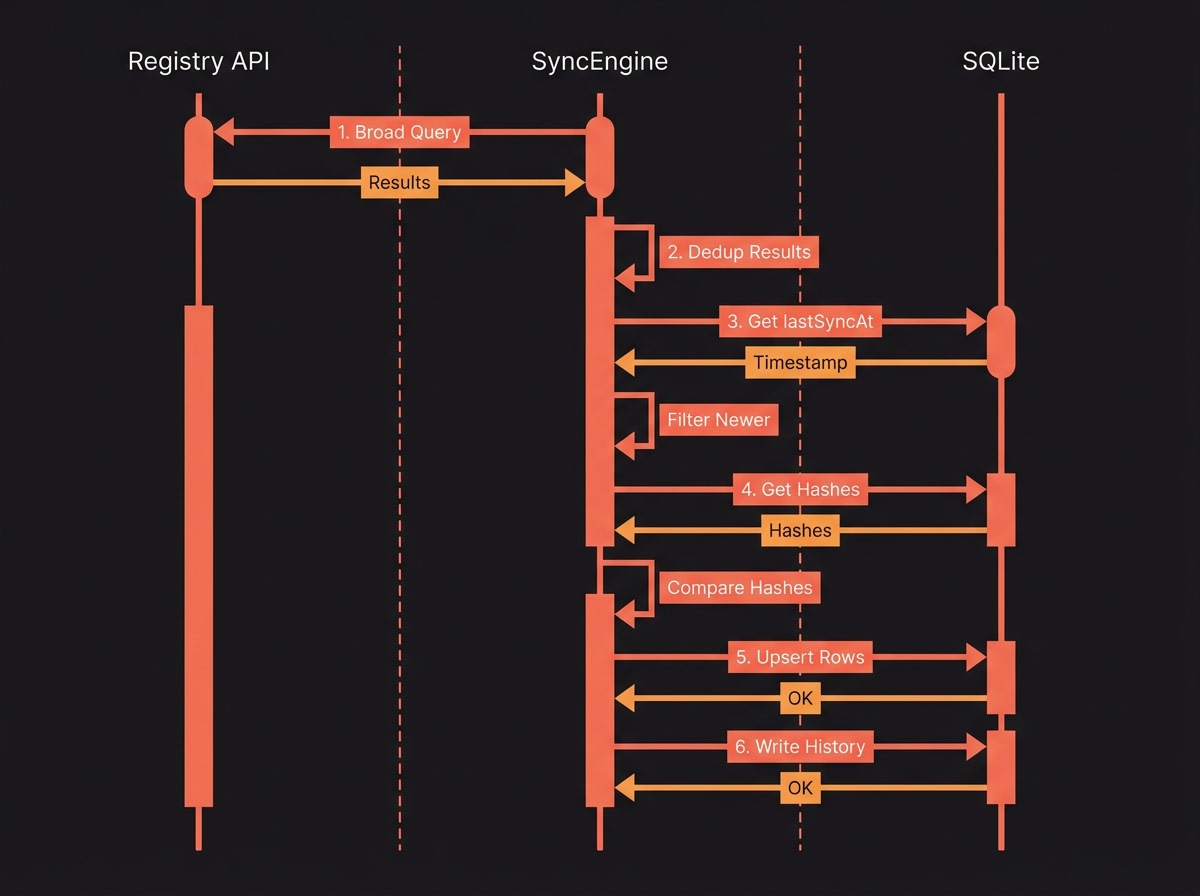
skillsmith sync populates and refreshes the local cache. The implementation is in packages/core/src/sync/SyncEngine.ts (lines 122–360) and runs as a differential pull by default — full refresh is available via --force.
The shape of an incremental run:
- Fetch from the registry API. The registry imposes a 2-character minimum on search queries, so SyncEngine fans out across a small set of broad queries (
git,code,dev,test,npm,api,cli,doc) to cover the namespace (lines 176–224). This is a workaround, not a load-bearing design choice — it keeps the API simple at the cost of a few duplicate hits we have to dedupe. - Deduplicate by skill id. Multiple broad queries return overlapping results; we collapse to a unique set before continuing (lines 193–199).
- Filter to changed rows. When
lastSyncAtis set (i.e. not the first run and not--force), we keep only skills whose registry-sideupdated_atis strictly newer than our last sync (lines 238–245). On a registry with thousands of skills and dozens of changes per day, this turns a multi-thousand-row sync into a few-dozen-row sync. - Compare and upsert. For each candidate, we compare the registry’s
content_hashagainst the local row. If they differ, we upsert intoskillsand append the new version toskill_versions(lines 376–423). Identical hashes are no-ops. - Persist sync state. We update
sync_config.lastSyncAtand append a row tosync_historywith start/finish timestamps and counts (lines 293–311). If you’re debugging a flaky sync,sync_historyis the first place to look.
A few things sync does not do, by design:
- It does not recompute embeddings. Embeddings are populated lazily when semantic search is enabled — keeping them out of the sync path means the default
syncis fast and doesn’t pin you to the model download. - It does not delete locally installed skills. Your client’s skills directory (default
~/.claude/skills/for Claude Code) is your file system, not ours.synconly mutates the registry cache. - It does not re-run security scans. Those are server-side artifacts; we cache the result.
Typical incremental run is on the order of tens of seconds, dominated by registry API latency rather than local CPU.
import-local — the other direction
sync flows registry → cache. skillsmith import-local flows the other way: it walks ~/.claude/skills/ (or any directory you point it at — pass --client cursor to walk ~/.cursor/skills/, etc.), parses each SKILL.md (the markdown-with-frontmatter file format that defines an agent skill — name, description, trigger phrases, and the prompt body), and writes the result into the same skills table with a source = 'local' marker. The implementation lives in packages/cli/src/commands/import-local.ts.
This matters for two cases. First, hand-installed skills — skills you copied into your client’s skills directory from a teammate’s repo or your own scratch — show up in skillsmith search after import-local even if they were never published to the registry. Second, locally authored skills under active development; pass --watch and the importer rebuilds the index whenever you save a SKILL.md, so search reflects your work-in-progress alongside everything else.
import-local writes to the same table sync does, but the source = 'local' marker is load-bearing: a subsequent skillsmith sync (with or without --force) will skip rows where source = 'local', so the registry never silently overwrites your unpublished WIP. Each local skill’s id is a deterministic hash of its canonical path, so re-running import-local on the same directory upserts in place rather than duplicating.
Tradeoffs
Local-first costs disk and adds a sync step. We think the tradeoff is worth it, but it’s worth being explicit:
Wins. Search latency is local-disk speed, not network speed — sub-millisecond FTS5, sub-second semantic when opted in. Your queries do not leave your machine, which matters for proprietary projects, privacy-sensitive workflows, and anyone running on a network where you’d rather not log “what skills were they searching for?” to someone else’s analytics. You burn fewer API quota credits because every search hits the cache instead of the registry. And when the registry is down or your network is flaky, search still works — the cache doesn’t care.
Costs. The cache takes disk — typically tens of MB of metadata for the full registry; add ~25 MB if you opt into semantic search and download the ONNX model. Data is stale until the next sync; if a skill was updated this morning and you haven’t synced since yesterday, you’ll see yesterday’s metadata. The default sync cadence is up to you (we don’t auto-sync on every command), so long-running stale caches are possible. Native modules (better-sqlite3, onnxruntime-node) ship as prebuilt binaries for common platforms; when those binaries fail to load — usually after a major Node upgrade — the WASM fallbacks kick in automatically, but you may see a one-time slowdown the first time WASM compiles.
We’ve found these tradeoffs to be the right ones for a developer-tool registry where most queries repeat, the data shape is small, and privacy of “what are you about to install?” is a real consideration.
What’s next
If you want to know how the registry got those rows in the first place, read the companion post: “From GitHub to Search Results: How Skillsmith Indexes and Curates Skills”. If you’re trying to decide whether to use the MCP server, the CLI, or the VS Code extension, the comparison page at /product walks through which surface fits which workflow. And if you have a question that didn’t get answered here, the docs FAQ is the next stop.