Publishing a Skill Your Whole Team Can Trust: A Private Registry Walkthrough
Publish, approve, and install a skill in Skillsmith's Enterprise-tier private registry, step by step, with real screenshots.
You just wrote a skill your whole team should be using. Not a folder you forked and half-remember editing, an actual shared source of truth: one registry, versioned, with a real person’s name on every publish and every approval. Here’s exactly what that looks like, start to finish.
Find your namespace first
Every team on the Enterprise tier gets one fixed namespace, a short prefix like your-team/ shown at the top of the private registry dashboard under your account settings. Think of it as your team’s own shelf in a shared library: you can only put books on your own shelf, and the system checks the label on every single book before it goes up, not just when the shelf was first built.
Publish a version
Publishing goes through the private_registry_publish MCP tool: your skill ID (in your-team/skill-name format), a version number, and the packaged files. Here’s a real response from a publish tonight:
{
  "success": true,
  "dataSource": "live",
  "skill": {
    "skillId": "your-team/skill-name",
    "version": "0.1.0",
    "description": "Formats commit messages to match our team's changelog conventions.",
    "deprecated": false,
    "publishedAt": "2026-08-23T14:32:07.000Z",
    "publishedBy": "4e2f6a8c-9d31-4b7a-8e5f-1c6a9d2f7b30",
    "registryUrl": null,
    "approvalStatus": "pending",
    "approvalMode": "review"
  },
  "skillNamespace": "your-team",
  "message": "Submitted your-team/[email protected] for review — an admin must approve it before teammates can install it. Review confirms who published this and what version/description was submitted; it does not include a full content read by the approver."
}
That version is now a pending submission. It doesn’t show up in search, it doesn’t come back from a lookup, and you can’t install it, not even you, the person who just published it. Publishing puts the version on the shelf; nobody can check it out yet.
A teammate has to say yes
This is the part that makes the registry worth trusting: the submission shows up on the dashboard under “Pending Submissions,” with an Approve button and a Reject button sitting right next to it.
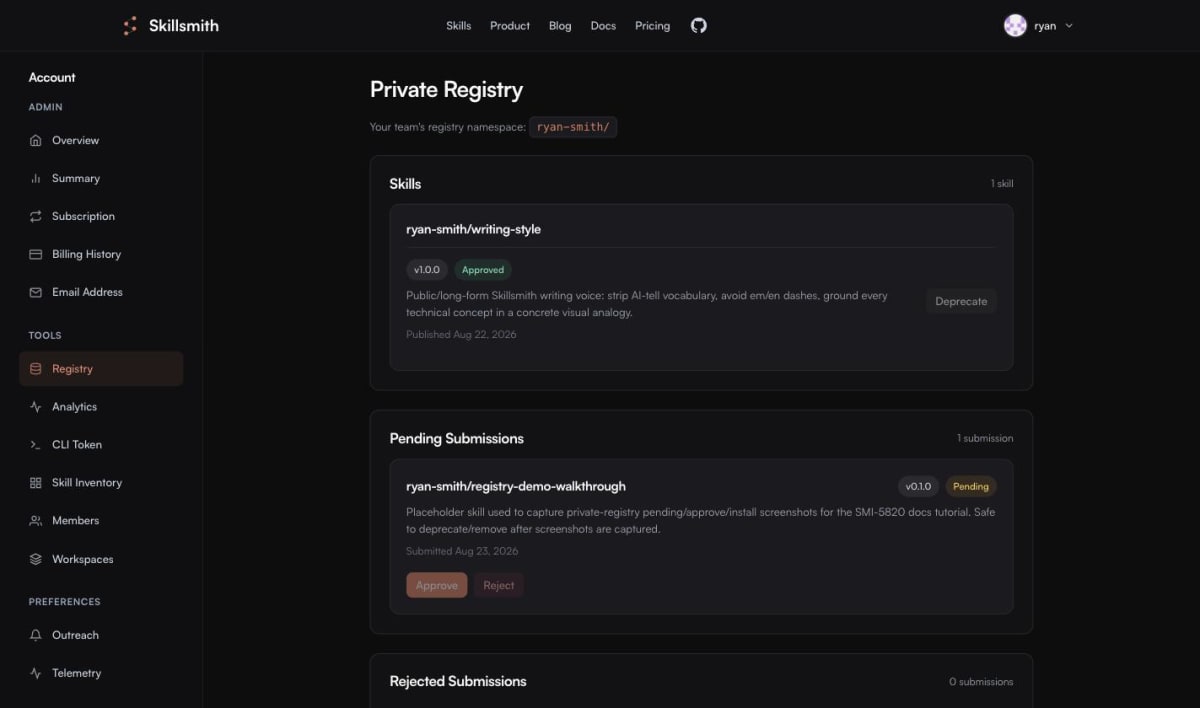
Neither button works for the person who published the submission, even if that person is a team admin. It’s the same reason a restaurant doesn’t let the cook also sign off on their own health inspection: the check only means something if it comes from someone else. A different admin has to click one of those two buttons, and the decision is final. A rejected version can’t be reopened, only replaced by publishing a new one.
Once a teammate approves it, the skill moves into the “Skills” section with an “Approved” badge, ready for the whole team.

Install it with the CLI
For installing, the CLI is the simplest path:
skillsmith registry install your-team/skill-nameA real run looks like this:
- Fetching skill from private registry...
✔ Skill installed

Skill installed successfully!
  Path: /Users/you/.claude/skills/skill-name
  Trust tier: community
Your own signed-in session is all it takes. Nobody needs to hand you an admin key or drop a credential on your machine to get a skill installed, your regular login carries the whole request.
What you get out of it
One published version, one real approver, one shared shelf your whole team reads from. No more “which copy of this skill is the current one,” no more skills living in someone’s personal folder that only they remember to update. If you want the full reference, including how deprecation and access control work underneath all of this, the Private Registry docs cover it, and the step-by-step tutorial walks the same path this post just did.