Skillsmith as an Enterprise Reference Architecture
A blueprint for running Skillsmith on your own infrastructure — source-available under the Elastic License 2.0 — with Supabase (or an equivalent), edge functions, local SQLite, the MCP server, CLI, and VS Code extension, plus a private registry and an IAM/RBAC access model.
Updated: September 8, 2026
Most teams meet Skillsmith as a hosted product: point Claude Code at our MCP server, search for skills, install them. But the same architecture is something you can stand up inside your own cloud. This post is the reference architecture for that — what the pieces are, how they fit, and what changes when Skillsmith runs on infrastructure you control.
A note on honesty up front: this is a target-state blueprint. The discovery, indexing, and distribution layers ship today. The private registry, IAM/RBAC, and SSO all route to a real, database-backed live service — active whenever Skillsmith runs against a configured Supabase project, which is the normal case for both the hosted product and a properly configured self-hosted deployment. Only when no database is configured at all does any of the three fall back to an in-memory stub. Where that matters, the text says so.
Licensing, and what you pay for
Skillsmith is source-available under the Elastic License 2.0. Every package — core, the MCP server, the CLI, the VS Code extension, and the enterprise package — ships under the same license, and running Skillsmith on your own infrastructure for your team’s internal use is permitted at no charge: the copyright grant is royalty-free and worldwide. So an enterprise client pays for neither the software nor permission to self-host — both are already granted.
What an Enterprise subscription buys is a license key and a support commitment. The license key — a signed JWT — unlocks the gated feature set: SSO/SAML, RBAC, audit logging, SIEM export, the private registry, and advanced analytics. (Compliance reporting has since graduated to the Team tier and up — it no longer needs the Enterprise key.) The support commitment is the enterprise SLA: a 99.9% uptime target, dedicated support, custom integrations. Without the key, the core discovery, indexing, and installation tools still run for free; the gated features simply stay locked.
The API key is a separate credential doing a different job: it authenticates calls to a registry — the public Skillsmith registry, or your own private registry — and sets their rate-limit tier. The license key decides which features you have; the API key authenticates the calls your deployment makes. The one use that needs a separate commercial agreement — beyond any subscription — is offering Skillsmith to third parties as a hosted or managed service. That is the whole model.
What’s shipped
| Component | Status |
|---|---|
@skillsmith/core, MCP server, CLI, VS Code extension |
Shipped |
| Supabase data layer + edge functions | Shipped |
| Per-developer local SQLite index | Shipped |
GitHub indexer + skillsmith sync |
Shipped |
| Private internal registry | Shipped; live when a database is configured |
| IAM/RBAC enforcement, SSO/SAML | Shipped; live when a database is configured |
The entities that make up Skillsmith
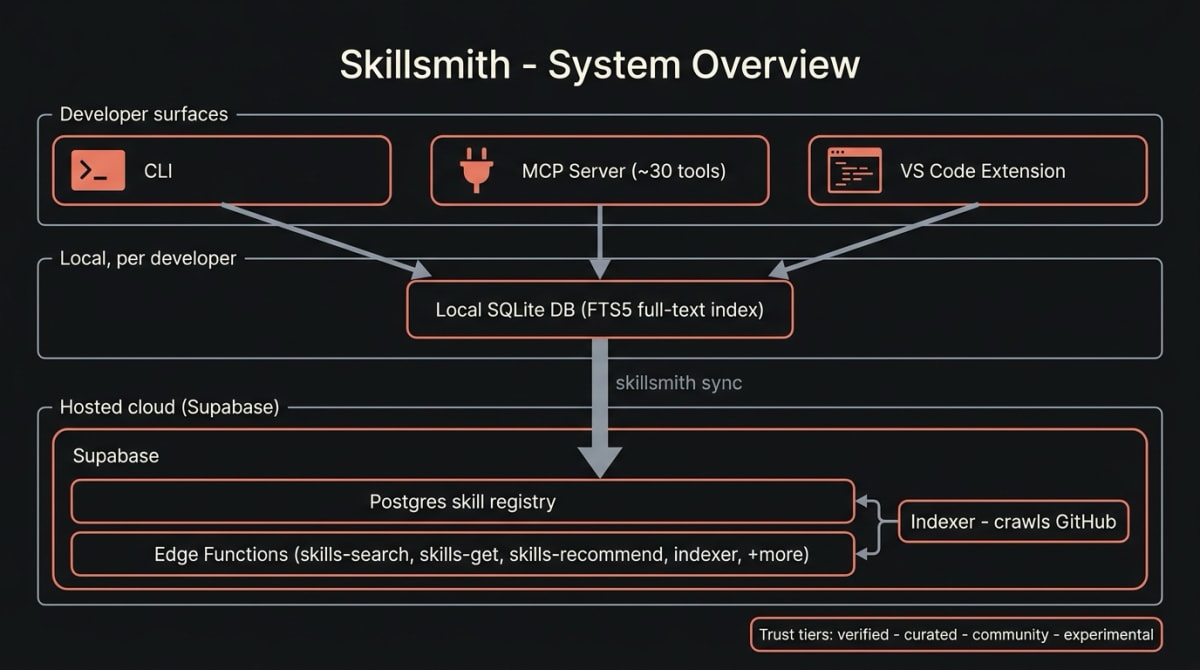
Skillsmith is a small number of cooperating parts:
@skillsmith/core— the database layer, repositories, and domain services.@skillsmith/mcp-server— the Model Context Protocol surface Claude Code talks to, exposing forty-plus tools (search,install_skill,skill_recommend, and the rest).@skillsmith/cli— the terminal interface.- VS Code extension — the same capabilities inside the editor.
@smith-horn/enterprise— SSO, RBAC, audit logging, and the private registry.- Supabase — a Postgres skill registry plus a set of edge functions
(
skills-search,skills-get,skills-recommend, theindexer, and roughly fifty more). - A local SQLite database — one per developer, with an FTS5 full-text index for fast offline search.
Every skill in the registry carries a trust tier — official, verified,
curated, community, experimental, unknown, unverified, or local —
which downstream policy can key off.
The same architecture on your infrastructure
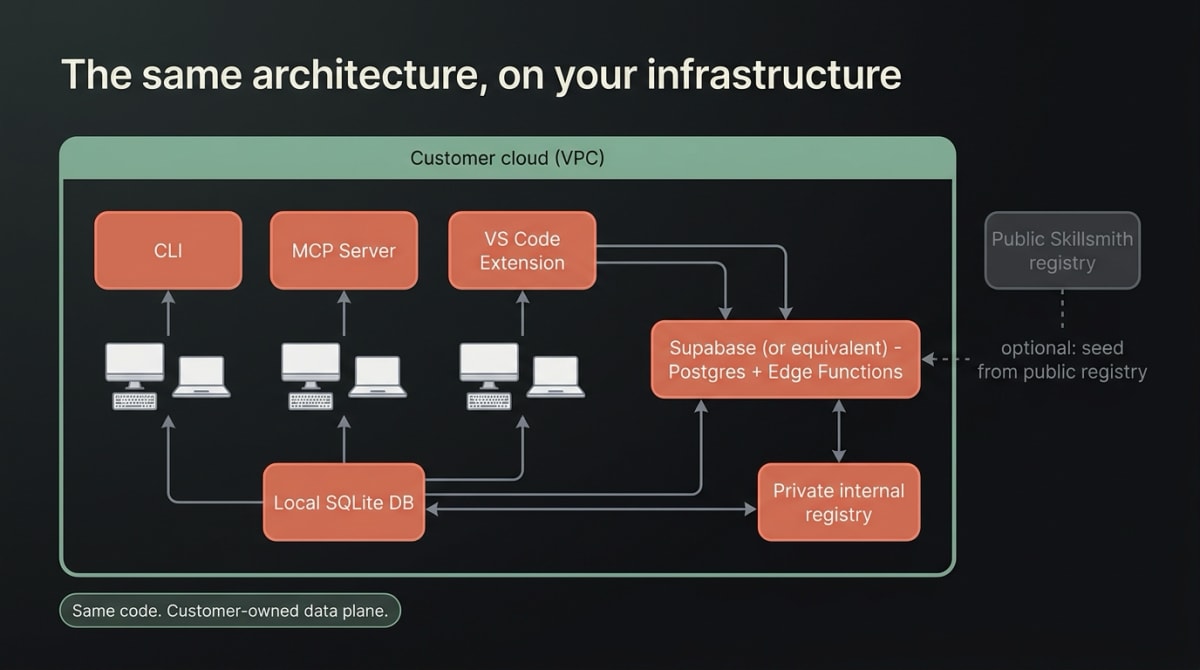
When a partner deploys Skillsmith, the entity list does not change — only who owns the infrastructure. The MCP server, CLI, and extension run as before. The data layer becomes your Supabase project (or an equivalent Postgres host with edge functions). The local SQLite index stays where it always was: on each developer’s machine. And a private internal registry gives your organization a place to publish skills that never leave your boundary.
The point worth underlining for a security review: it is the same code. There is no fork, no parallel “enterprise build” to keep in sync. What differs is the data plane — and it is yours.
Indexer & registry data flow
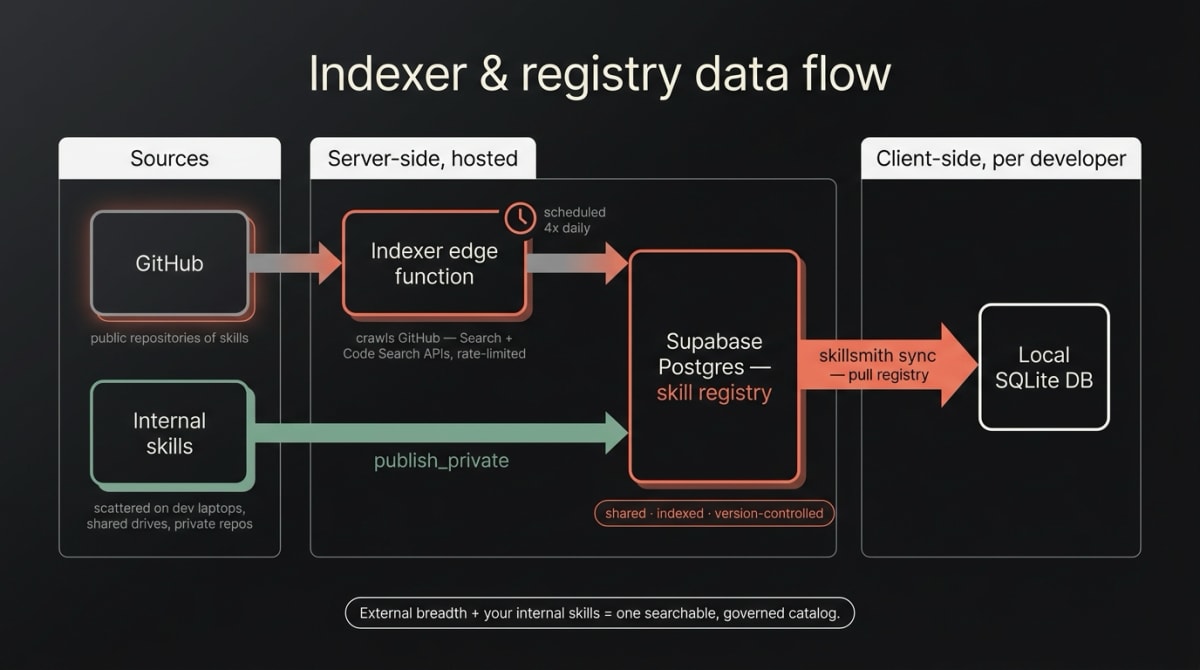
Skills reach the registry from two kinds of source — external and internal — and three mechanisms move them:
- The indexer is a server-side edge function. On a schedule — eleven runs a day in our hosted deployment: one maintenance pass, one recheck pass, and three discovery cycles split into three phase-slots each — it crawls GitHub via the Search and Code Search APIs, under rate-limit budgets, and writes discovered skills into the Supabase Postgres registry.
- Internal authored skills are your own organization’s source. In most
companies these start scattered — a
SKILL.mdon one developer’s laptop, a prompt on a shared drive, a snippet in a private repo, none of it discoverable by anyone else.publish_privateandprivate_registry_publishmove them into your internal registry, where they become shared (the whole team can find them), indexed (searchable like any other skill), and version-controlled (tracked, diffable, updatable) instead of stranded on one machine. skillsmith syncis a client-side command. It pulls the registry into each developer’s local SQLite database — fast, offline-capable search without re-crawling anything.
A partner deployment composes these: seed from the public Skillsmith registry and/or run the indexer against GitHub for breadth, then layer your own internal skills on top — one searchable, governed catalog instead of tribal knowledge scattered across drives and laptops.
Provisioning and access control
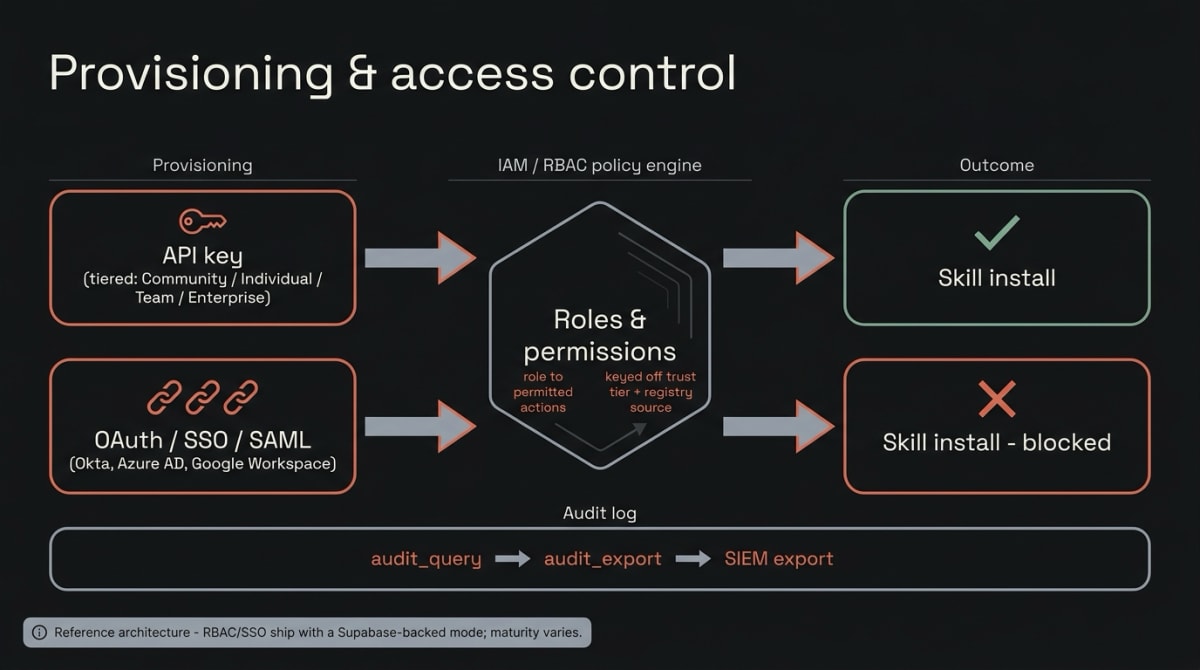
Users reach the system one of two ways. API keys are tiered — Community, Individual, Team, Enterprise — and rate-limited accordingly. OAuth / SSO / SAML integrates with the identity providers an enterprise already runs (Okta, Azure AD, Google Workspace).
On top of provisioning sits the IAM/RBAC layer: roles and permissions that
govern which skills a user may install, with policy keyed off a skill’s trust
tier and its registry source. A community-tier skill from the public registry
and a verified skill from your private registry are different risk profiles,
and the model lets you treat them differently. Every action is written to an
audit log, queryable and exportable to a SIEM.
To be straight about maturity: the RBAC, SSO, and private-registry tools all exist, are wired into the MCP server, and now share the same live/stub split. Each routes to a real, database-backed live service that activates when Supabase is configured — the normal case for the hosted product, and for any self-hosted deployment set up the same way — falling back to an in-memory stub only when no database is configured at all. Treat this layer as the real access-control model of the reference architecture, gated to the Enterprise tier: not a mock-up, though any deployment should still run it through your own security review before relying on it for a specific compliance regime.
Why this matters for partners
- Data sovereignty. Skills, registry, audit log, and developer indexes all live inside your boundary.
- No fork. You run the same source-available code we do; upgrades are upgrades, not merges.
- A compliance story. Trust tiers, RBAC, and an exportable audit log give a security team something concrete to evaluate.
- Gradual adoption. Start with the hosted registry and the CLI; add a private registry; turn on SSO and RBAC when you’re ready for them — without re-platforming.
If you are evaluating Skillsmith for an enterprise deployment, this is the shape of what you would be running. Get in touch and we can walk through it against your environment.