Your Skills, Across Every Machine You Use
A walkthrough of Skillsmith's cross-machine skill inventory: push what's installed on one machine, see it on the dashboard, and know at a glance which skills have updates waiting.
If you use more than one machine, say a laptop and a desktop, or a work machine and a personal one, you’ve probably had this moment: you reach for a skill you know you have, and it isn’t there. It’s on the other computer.
Skillsmith’s installed-skill inventory fixes that. Push from any machine, and a read-only dashboard shows you what’s installed everywhere, plus which skills have a newer version waiting. Here’s what that actually looks like, end to end.
Turn it on
Cross-machine inventory is opt-in and off by default. One toggle, under Account → Telemetry:
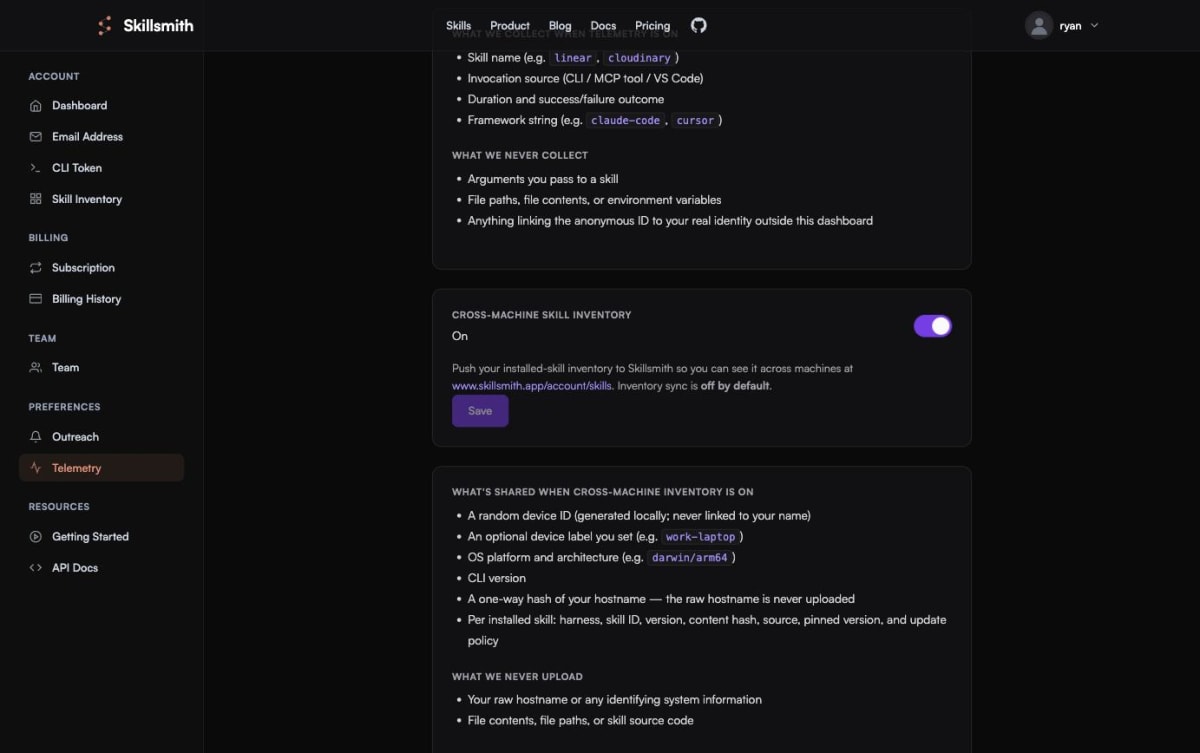
The page tells you exactly what gets shared before you flip it: a random device ID that’s never linked to your name, an optional label you set yourself, your OS and CLI version, and (per skill) the harness, skill ID, version, and content hash. What never leaves your machine: your real hostname, file contents, file paths, or skill source code.
Push from a machine
With the toggle on, one command:
skillsmith inventory pushThat’s it. The CLI walks every harness it knows about (Claude Code, Cursor, Copilot, Windsurf, and more), finds what’s actually installed, and uploads the metadata.
See it on the dashboard
Head to Account → Skill Inventory, and the machine that just pushed shows up immediately:

This is the part that actually surprised me running it live: Skillsmith cross-references every skill’s content hash against the registry’s latest version, in real time. Anything that’s drifted gets a clear Update available badge, right next to the exact command to fix it. There’s no separate “check for updates” step; the dashboard already did it the moment the push landed.
Push from a second machine, and the same view becomes a real cross-machine comparison: which skills you have everywhere, which ones are only on one box, and which ones are quietly out of date on both.
Why this matters beyond “don’t lose track of your skills”
The obvious win is personal: never wonder again whether the skill you want is on this laptop. But the same mechanism is the foundation for something bigger we’re building next: using this exact inventory pipeline as the on-ramp for team private registries. A team member’s machine already knows what’s installed; the natural next step is letting a team admin pull those skills straight into the team’s shared, curated registry, instead of everyone re-discovering and re-installing the same things independently.
Read-only visibility today, a real team workflow next. Turn it on, run the push, and see your own machines show up.